









Key Takeaways
- Know what internal linking is.
- Find out why you need internal linking in SEO.
- Know when to internally link content on your website.
- Get the details of the 7 best internal linking tools in 2026.
Think of the content roster of a website as a huge library. It’s in the best interest of the website owner to keep the similar books on the same shelf, isn’t it?
Alternatively, visitors also have an easier time, as they can find everything they need in close proximity. So, if they can find one book, they will find several similar ones at once. In other words, if they click on one article, they can basically get access to many other important ones.
This is what internal linking is all about. When you link articles internally, you aren’t just doing it for the SERP rankings. Yes, sure, that’s a bonus. But even more so, internal linking helps you to categorize the important articles in your own roster.
These days, we have specific tools that handle linking between two relevant articles for you.
In today’s article, we’re going to find out all about the 7 best internal linking tools in 2026. We’ll get to know what internal linking is and why it’s needed in SEO. Additionally, we’ll provide a rundown on when to internally link content to ensure a better performance for your website.
Table of Contents
- Key Takeaways
- What is Internal Linking?
- Why Do You Need Internal Linking in SEO?
- When to Internally Link content?
- Best Internal Linking Tools Dominating in 2026
- Final Verdict
What is Internal Linking?
Linking is a great way to get more visitors to check out your website. In the SEO world, two types of links are most prevalent. They are – 1. Internal/Inbound Links, and 2. External/Outbound Links, respectively. Both of them play an important factor in improving your website performance.
Internal linking takes place when you link to another content from your own website. Let’s say you have two recipe articles – one for cakes, and another for cookies. If you link to the ‘cookies’ article in your ‘cake’ article and vice versa, you can say you’ve interlinked them.
Again, when you’re using hyperlinks from a different website instead of your own, they are called outbound links. As in, links that go beyond your website. Like inbound links or internal links, outbound links help to improve the content performance across multiple websites.
Why Do You Need Internal Linking in SEO?
Moving on, let’s check out why you need internal linking in SEO. We’ve already established that it connects one of your blogs to another in the same website.
But how exactly is it related to SEO? Well, let’s see:
1. Visitors Stay Longer on The Website
With the help of internal linking, visitors can find useful content in close proximity. This encourages them to continue to the next blogs and so on. Instead of leaving after reading the first article, they stay longer on the website. Hence, interlinks contribute to low bounce rates.
2. Boosts Keyword Rankings
Internal linking helps to boost site keywords across multiple articles. And you can seamlessly avoid keyword cannibalization at the same time. By using the keyword to refer to a different article, you can improve your SERP rankings for both articles.
3. Enables Search Engine Bots to Index Your Blogs Faster
Internal linking also helps search engine bots to crawl through your website faster by following the site hierarchy efficiently. The crawlers can find the related blogs and index them swiftly.
4. Improves User Experience Significantly
Users and visitors can find useful information from multiple articles on the same website. So, they don’t have to look for that information elsewhere. Additionally, they can easily navigate through the website, and find related articles easily and intuitively.
5. Boosts Blogs with Low Performance
If one article performs really well, you can place the hyperlinks of some low-performing articles in that one to boost link equity throughout the site. The visitors, upon visiting the high-authority pages/blogs, can go to the low-ranking ones to improve overall site performance.
When to Internally Link content?
Did you know that it costs approximately $77.80 on average for a paid guest post? With internal linking, you can cut down the costs significantly and bring in visitors from your own articles.
Here’s a brief rundown on when to internally link content in your website:
1. Every Time You’re Publishing a New Content
Whenever you’re posting a new blog, always try to link it to previous blogs to establish a topical hierarchy. Additionally, you can also promote link equity by doing this.
For example – if you’re posting new content on the ‘7 best AI plugins for websites’, you can link to previous blogs such as ‘How to install AI plugins’ for better interactivity.
2. While Republishing or Revamping Old Content
It’s important to constantly update your old content so that they stay relevant. When you’re revamping old content, you can insert new (related) content links to boost the performance of both articles. You should also remove broken links or hyperlinks of deleted blogs.
3. When Different Articles Are in the Same Niche
Let’s say you’re writing about aquariums or fish tanks in some articles even though your website is really about marine life. So, you can interlink these different articles as they have a similar niche to establish topical hierarchy. Visitors can also find them easily due to this.
4. To Avoid Explaining a Concept You’ve Already Explained
You cannot explain every single term or concept in a single article. Unless you want the word count to go over tens of thousands, that is. That’s why, instead of explaining a concept broadly, you can simply link to an article where you’ve described it properly with references.
5. When You’re Doing Topic Clusters
A topic cluster includes a main topic and multiple sub-topics. For instance – if the main topic is ‘WordPress Plugins’, the sub-topics can be ‘WordPress AI plugins’, ‘WordPress LMS plugins’, etc.
Whenever you’re doing topic clusters, you should always interlink the articles, so that visitors can find their way to the other sub-topics in a hassle-free manner.
6. When You Want to Transfer Traffic from High-Authority Pages
Like we have mentioned in the previous section, internal linking helps to improve the SERP rankings of low-performing articles by driving traffic from high-authority pages/articles.
Visitors are more likely to trust and revisit the hyperlinks in a top-ranking blog. So, by linking to underperforming blogs, you can increase the SERP rankings of those blogs as well.
However, if you don’t link to quality blogs i.e. simply link below-average articles to boost traffic, it’ll do more harm than good. Visitors will lose interest and feel scammed. As a consequence, bounce rates will go back up and lower the status of your high-authority blogs.
Now that you know when to internally link content, here’s a short overview of when not to internally link content as well. Make sure to avoid these common SEO mistakes!
- Don’t overstuff your blogs with links just to get traffic.
- Only use relevant hyperlinks i.e. only link to related blogs/sources.
- Don’t use the same anchor text over and over again.
- Don’t link to broken pages or low-quality blogs.
- Don’t use the same hyperlink in a blog more than once or at best, twice.
Best Internal Linking Tools Dominating in 2026
Now that you know what internal linking is and why it’s so important, it’s time to go over some of our favorite tools that do the job quite well.
To curate this list, we kept three things in mind. First off, we prioritized hands-on testing to check out their performance and individual strengths.
Secondly, we kept a variety of options with different features and functions for everyday use.
And lastly, we focused on the price range to help out beginners, entrepreneurs, and big businesses alike.
LinkBoss
LinkBoss is one of our top choices as it complements all functional sites. With site-focused packages, it helps to boost the internal linking structure of pages to improve website SEO significantly.
LinkBoss comes with a Silo Preset to build topic clusters fast. With the preset, you can create multiple Silo structures such as Reverse Silo, Priority Silo, etc. with a single click.
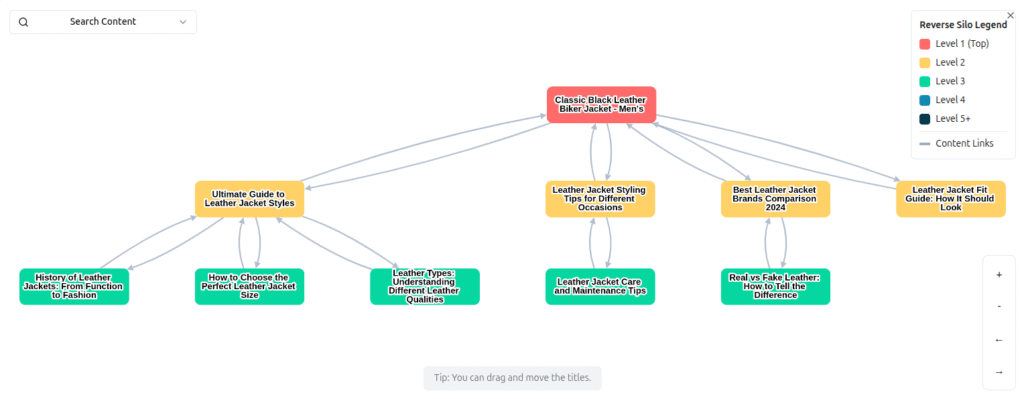
It promotes bulk auto interlinking where you can get up to 1000 relevant link opportunities in one click. It would normally take weeks to come up with that many links manually.
LinkBoss allows you to not only generate internal links but to audit them as well. You can easily locate and fix broken links, orphan pages, or dead-end hierarchies.
If you’re missing context but don’t have time to read the whole content, LinkBoss can come in clutch even there. It can generate fresh content for context. So, if you’re missing a good anchor text, LinkBoss can generate one and also provide a context-rich paragraph to go with it.
This internal linking tool also features an anchor text distribution analysis chart. You can check in real time the text density to distribute your links proportionally.
Link Whisper
Link Whisper comes with a 7-day free trial and it’s practically a sister version of LinkBoss. You don’t need any tech skills to operate this plugin. Just click and generate links, that’s it.
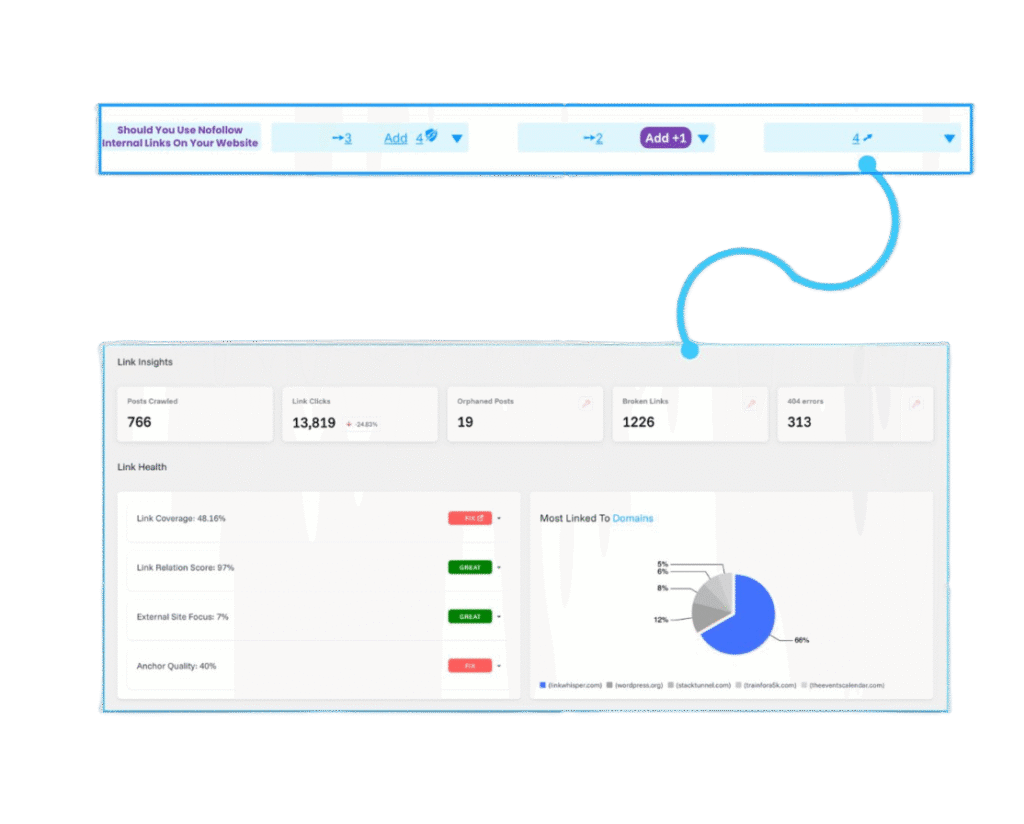
Link Whisper offers a critical feature – Link Health Dashboard. With this dashboard, you can instantly evaluate the internal linking structure and status of your entire website.
The dashboard helps you to find broken links, 404 errors, and sends you alerts immediately. That way, you can fix them before they affect your SERP rankings.
And did we mention the AI-powered suggestions? Yes, Link Whisper uses AI to analyze your site content swiftly and figure out the best internal links. It also distributes the anchor texts equally so that you can avoid overstuffing of keywords and internal links in an article.
This plugin comes with a monthly website report as well. That’s right, every 30 days, you get to overview the website performance, linking structures, topical hierarchies, etc. completely. You can readily compare the reports to identify your weak points and work on fixing them.
Lastly, if you own more than one site (preferably in the same niche), Link Whisper can help you to connect all your websites and show cross internal linking suggestions for more reach. This way, you can manage the linking structures of all your websites at once.
Yoast SEO
Yoast SEO is the ultimate SEO tool for both beginners and veterans. While Yoast SEO’s free version is already pretty useful, you need to unlock Yoast SEO premium to get and implement internal linking suggestions for your website.

With Yoast SEO premium, you can get a list of relevant and quality pages you can link to, based on your blog content. By implementing the suggestions, you can automatically strengthen your site structure and boost the topical hierarchies via connecting the related articles.
Yoast SEO premium also allows you to optimize up to 5 keywords per page. You can choose multiple keywords, find their synonyms and related keywords to place them naturally.
Like the previous two tools, Yoast SEO premium also sends you notifications about broken links or page errors. This ensures that clients or visitors don’t drift off to unnecessary pages.
With this premium plugin, you can unlock expert guidance from SEO moguls 24/7. Additionally, you can use AI to generate titles, meta descriptions, anchor texts, etc. at a moment’s notice.
And lastly, Yoast SEO premium seamlessly integrates with product platforms like Shopify. So, you can easily interlink your products within the blogs to boost your sales. You can redirect the traffic and redistribute it to your other platforms and websites effortlessly.
AIOSEO
We’ve mentioned several features of AIOSEO while reviewing the 7 best WordPress AI plugins. So, we’ll do a short overview in this one. As the name suggests, AIOSEO is a one-stop solution for all your SEO needs, whether you’re a beginner, a veteran, or an entrepreneur.
It comes with TruSEO on-page analysis, built-in SEO analytics tool, WooCommerce SEO, schema markup, keyword rank tracker, and so on. But that’s not the focus of today’s article.
AIOSEO is one of the best internal linking tools in this list because of its premium Link Assistant features. With AIOSEO’s link assistant, you never have to interlink your blogs manually again.
You can discover, add, remove, and edit internal links in less than a minute with this tool. Consequently, you can find related content smartly and efficiently on a big website.
Furthermore, you can prevent 404 errors, and redirect customers to high-authority pages so that you don’t lose out on traffic. It automatically establishes link equity as well.
Again, due to WooCommerce SEO integration, you can, once again, link to your own products, to boost your affiliate articles, and generate more in-house traffic.
LinkStorm
Next up, we have LinkStorm. It’s a simple but effective AI-powered tool built to generate smart internal linking suggestions for SEOs and publishers.
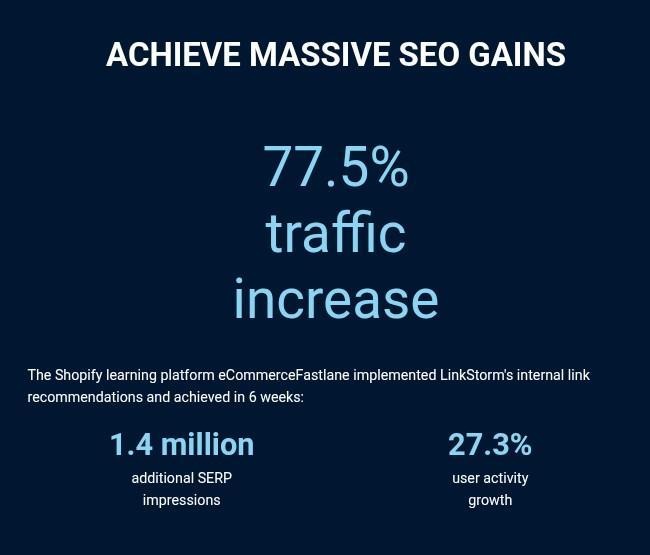
Like LinkBoss and Link Whisper, LinkStorm is focused solely on internal link optimization as well. It implements 2 distinct proprietary AI methods to suggest relevant link opportunities.
Additionally, it crawls all your websites and conducts a content audit automatically to analyze and identify your linking structure’s strengths and weaknesses. By reviewing this audit performance, you can significantly resolve your site’s key issues.
LinkStorm fixes your internal link issues by categorizing them into three categories – 1) no-follow, 2) broken, and, 3) redirected. By resolving the issues from these categories selectively, you can boost your website traffic immediately.
In addition to link report, you can get anchor reports as well. You can easily create well-optimized anchor texts to place them in your blogs naturally. This helps to avoid over-optimization of anchor texts and improves your SERP rankings.
Lastly, LinkStorm is famous for its auto-linking feature. If you want to get rid of manual linking entirely, you can simply activate this feature and it’ll automatically place the links for you. You have the power to change or remove links anytime you want.
LinkStorm’s pricing packages come in 4 tiers. The Small plan costs $30/month and covers up to 1000 URLs. The Medium Plan costs $60/month and covers up to 5000 URLs.
CrawlWP
CrawlWP is an impressive WordPress plugin that implements SEO directly in addition to internal linking to increase your visibility across search engines like Google, Bing, Yandex, etc.
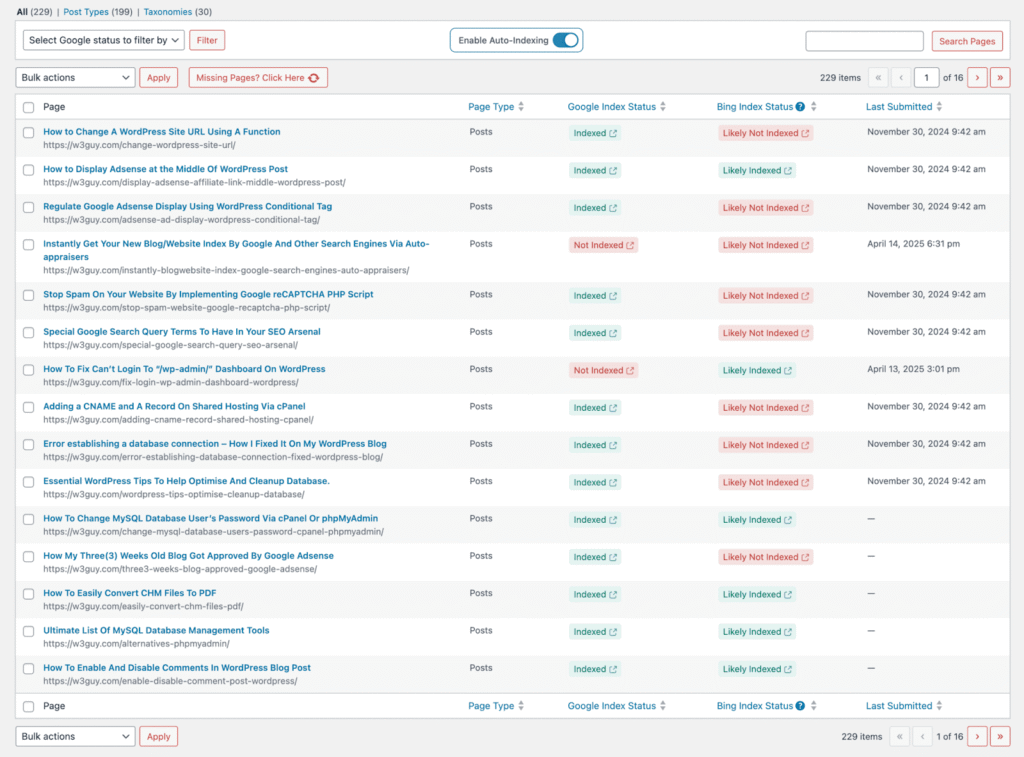
But how does it do that? Well, unlike traditional internal linking tools, CrawlWP takes things a little further by working on your content’s crawlability. It maps out the entire site and places internal links strategically so that search engines will crawl and index your content.
And it’s an automatic process. Whenever you publish a new content, this tool updates the linking structures in accordance with topical hierarchies so that they can rank higher.
It also comes with Bing search integration. You can easily monitor your keywords, clicks, impressions, and search engine rankings directly.
The tool offers a simple and intuitive interface for everyone. Even if you don’t have the technical knowledge, you can still run this plugin without any hassles.
You will receive email notifications once your content has been indexed via the crawlers. You can also receive website reports of all your indexed pages to see their performance.
WordPress Internal Link Optimizer
Lastly, we’ve got the WordPress Internal Link Optimizer, or, in short, WILO. WILO is the perfect choice for beginners who want to stick to a simple (and free) WordPress plugin.
But there’s a catch. WILO is not necessarily an automated tool. Yes, it identifies and facilitates internal links on a massive scale. However, it still works page-by-page and you still have to implement the links manually. As in, it guides the process while you do the work consciously.
And that’s not a bad thing at all! Or at least that’s what we think. You can manually check exactly what you are doing and revise your actions accordingly. Hence, it’s a good tool for beginners as they can learn about internal links and apply them practically.
As far as features go, WILO allows you instant visibility of all your internal links. Also, it comes with an advanced search tool of its own. You can visit any page of your website to check out the list of possible internal link opportunities at any given time and implement them directly.
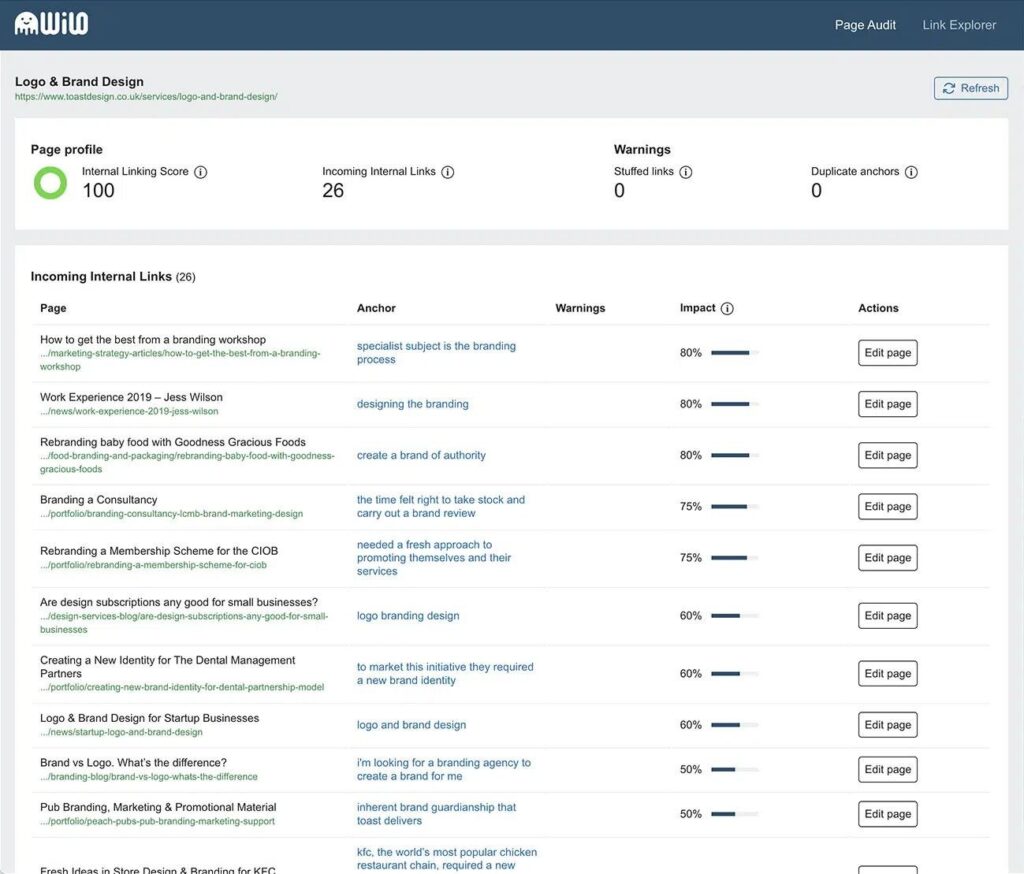
It also tracks down poor linking structure. You can optimize the links for better performance or replace them entirely by going over the link opportunities.
WILO’s advanced algorithm gives you an internal linking score out of 100. You can use this score as a checkmark to remove broken links, update existing links, etc. to showcase the improvements by increasing the score in real time.
This tool also helps you to identify short and repetitive anchor texts. That way, you can broaden the anchor texts or replace them to improve your SERP rankings.
Final Verdict
Well, time to say sayonara for today. Hope you liked our article on the 7 best internal linking tools in 2026. Our aim was to offer simple but strategic solutions to everyday problems with internal links.
If you want reliable and long-term solutions, we’d highly suggest going after Link Whisper or Link Boss. They are jam-packed with essential internal linking features to jumpstart your website SEO.
But that’s the thing. Both of them are strictly tools for fixing internal linking structures only. If you want to optimize your entire website SEO, starting from keyword suggestions to SERP rankings analytics, we’d suggest going for tools like Yoast SEO premium or AIOSEO instead.
And lastly, if you just want to test the waters without any financial commitments, WordPress Internal Link Optimizer, or, WILO is always there to guide you. You can download this free plugin anytime to study all about the placement of internal links and how they affect the SEO performance of a website.
We wish you all the best for your internal linking endeavors! Don’t forget to offer us your valuable suggestions if you have used any of these tools before.
Add your first comment to this post