









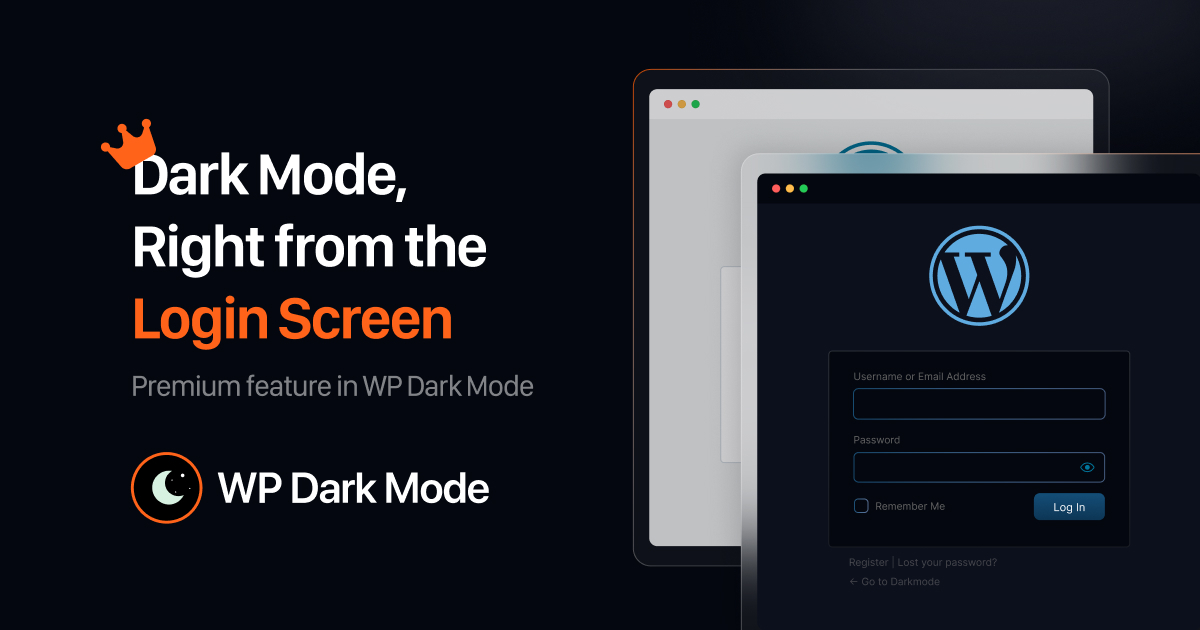
Hey there, Tired of squinting at that bright white screen when logging into your WordPress site at night? Well, good news. Dark mode for WordPress login, Register & Reset pages is here and ready to help.
Actually, it’s a game-changer. This neat trick switches your login, sign-up, and password reset pages to a cool, dark style that’s easy on the eyes no more glare when you’re burning the midnight oil.
And it’s not just about looking good. It makes your whole site feel tied together, super comfy, and way easier for everyone to use. Whether you’ve got a little blog or a big business page, it adds that slick, pro vibe.
Wanna give it a shot? Stick around to find out how to flip the switch and get that smooth login vibe going.
Key Points to Know
- Actually, the WordPress login page dark mode comes with WP Dark Mode Premium.
- It puts that dark style on login, sign-up, and password reset pages for a matching look.
- And it cuts down on eye tiredness, makes things easier to access, and keeps your site’s brand sharp.
- You can turn it on quickly from WP Dark Mode Switch Settings in your dashboard.
- Plus, it’s part of the premium stuff, with extra tweaks and smooth changes across pages.
So, this dark mode lets you tweak your login and other pages to a chill, dark look that fits your site. It’s in WP Dark Mode Premium and keeps things looking sharp, modern, and comfy, especially late at night. Just hit up the Switch Settings in your dashboard to get it rolling.
What’s This Dark Mode Thing?
Ever pop open your WordPress login late at night and get blinded by that white page? You’re not the only one. That’s why dark mode for login pages is such a handy fix. It turns those pages into a darker, softer look that’s kinder to your eyes.
And with WP Dark Mode Premium, your whole site starts to feel like one big, happy family. Putting dark mode everywhere just makes things smoother and nicer for you and whoever’s visiting.
Unlock Your Potential
So, you might be thinking, “It’s just a login page, does it need to be dark?” Yup, it sure does. Here’s the scoop ⤵️
- Bright screens can be rough, especially in a dark room. A dark background with light text chills things out. You’ll notice it big time first login after dark.
- Your login page is often the first thing visitors, like clients or team members, see. Dark mode gives it a clean, modern edge.
- Some people just see better on dark pages. This helps anyone with sensitive eyes or who likes a softer screen.
How to Turn On WordPress Login Page Dark Mode?
Good stuff, it takes like five minutes to set up. No need to know code or design tricks.
Here’s the quick rundown ⤵️
- Head to your WordPress dashboard. Log in as the big boss.
- Spot WP Dark Mode in the side menu. Check under Switch Settings.
- Switch on the Login Page Dark Mode. Look for the Premium option and hit that toggle.
- Make it yours. Pick a switch look, color vibe, maybe a little animation to match your style.
- Save it up. Hit “Save Changes” and peek at your login page to see the dark magic.
Done and done. Your login and other pages now rock that dark look without extra hassle.
Why It’s a Paid Thing
So, this login page dark mode comes with WP Dark Mode Premium. It’s got some fancy design bits behind it. Plus, it plays nicely with all the big WordPress themes and keeps things running smoothly.
And when you go premium, you also get 👇
- Cool switch styles like Sky Switch.
- Your own color and brightness picks.
- Dark mode for the admin spot, too.
- Neat little animations.
- Speedy performance, no lag.
The free version handles the basics for your main site. Premium gives you the whole deal, login and admin included.
A Real Example
Say you’ve got a little photography blog. You picked a dark theme to make your pics pop. All looks awesome till you hit that login page. Stark white totally kills the mood.
But, turn on WordPress login page dark mode? Boom, it fits right in. Those soft shades play up your brand colors, and logging in feels like a breeze.
Even a tiny fix like this makes your site seem more pro and fun to poke around on.
Why Users Appreciate Dark Mode
There’s a reason big apps like YouTube or Gmail got dark mode. People are online tons, and dark mode makes staring at screens less of a drag.
Here’s the deal 👇
- Less glare for late-night site checks.
- Saves juice on fancy screens like OLED.
- Helps you focus with clearer buttons and fields.
- Feels better for anyone who likes low light.
And adding this dark mode to your login ain’t just about style. It’s about making things comfy and easy for everyone.
Wrapping It Up
Hey, WordPress login page dark mode keeps your site easy on the eyes, all tied together, and looking sharp. It’s a small tweak that packs a big punch for comfort and class.
By popping dark mode on login, sign-up, and password reset pages, you make things nicer for visitors and simpler for you anytime.
Already got dark mode on your site? Time to step it up. Grab WP Dark Mode Premium and get that login page matching the calm, cool look of everything else.
Just a couple clicks, and your WordPress login feels spot-on, day or night.
Add your first comment to this post