









You didn’t notice it at first. Maybe your checkout page started loading a second slower. Maybe your team mentioned the orders dashboard felt laggy. Maybe your biggest sale of the year turned into a scramble because the backend was crawling.
The store looks fine from the outside. But behind the scenes, something’s weighing it down.
Old orders. Thousands of them. Still sitting in your live database, even though those customers received their packages months ago.
This is one of the most common and most overlooked performance problems in growing WooCommerce stores. And once you understand what’s happening, the solution becomes obvious.
When Orders Pile Up, Everything Slows Down
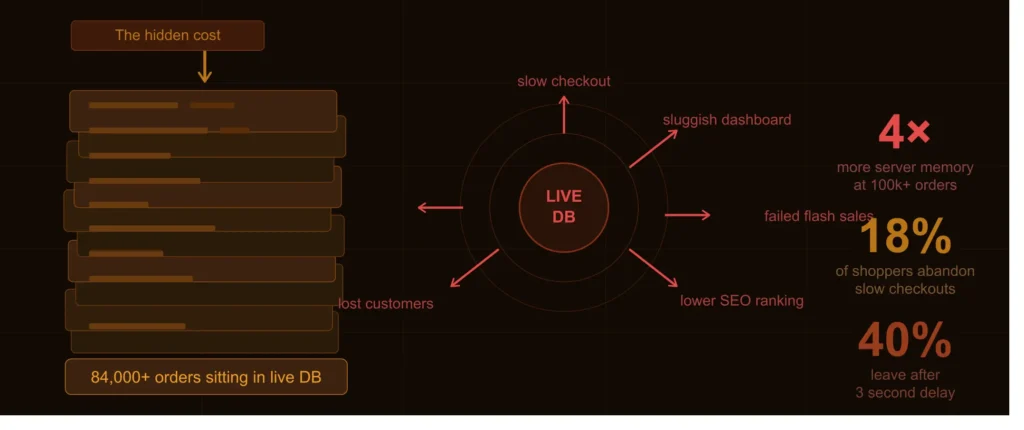
Every order your store processes gets saved to your database. That’s by design; you need the records. The problem is that WooCommerce keeps all of them in the same active database: the completed order from three years ago, the one from last week, and the one happening right now.
As that pile grows, your database has to work harder for everything. Not just order history, everything.
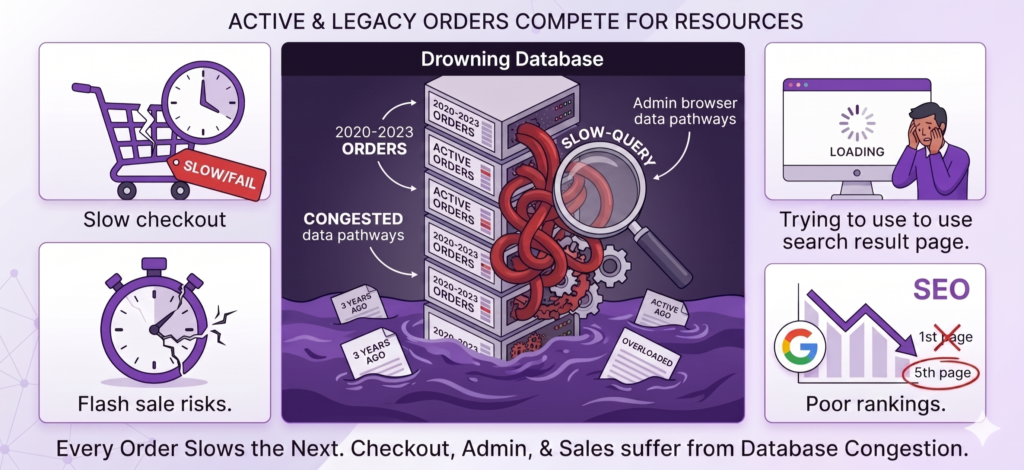
Your checkout starts to drag
Shipping calculations, coupon validation, and tax lookups all of these queries compete for resources with thousands of old records they don’t need. Customers notice. A slow checkout is one of the top reasons people abandon their carts right before they buy.
Your admin dashboard becomes painful to use
Searching for an order takes longer. Filtering by status feels sluggish. Pages freeze at the worst possible moments. Your team starts dreading the back end, and that frustration has a real cost.
Flash sales become high-risk events
Traffic spikes during promotions put your database under maximum stress. If it’s already bloated, checkout pages can stop loading entirely. Customers hit error screens. The sale you spent weeks preparing becomes a support ticket nightmare.
It quietly affects your search rankings, too
Google measures how fast your pages respond. A bloated, unmanaged database pushes your response times up, and gradually pulls your store down in search results. The traffic you worked hard to earn starts slipping away.
None of this happens suddenly. It creeps up on you, and by the time it’s obvious, it’s already costing you.
There’s a Better Way: Archiving
Archiving isn’t deleting. That’s the first thing to understand.
Think of it like clearing your desk. You’re not throwing anything away; you’re moving what you don’t need right now into organized storage, so you can actually work. The files are still there. You can access them whenever you need them. But they’re no longer cluttering your workspace.
Archiving your WooCommerce orders works the same way. Completed orders from months or years ago get moved out of your live database into separate, secure storage. Your active database stays lean. Everything that was slowing down your store, the bloat, the extra load, the unnecessary weight, gets lifted.
Your old records don’t disappear. You can still search them, view them, and pull them up any time. They’re just no longer sitting in the middle of every transaction your store tries to process.
Meet ArchiveMaster: Order Archiving Built for WooCommerce
ArchiveMaster is a WordPress plugin that handles all of this for you, automatically, securely, and without touching anything you still need.
You don’t need to be a developer to use it. You don’t need to configure servers or write queries. You install it, set your preferences, and let it run in the background while you focus on your store.
Here’s what happens when you do:
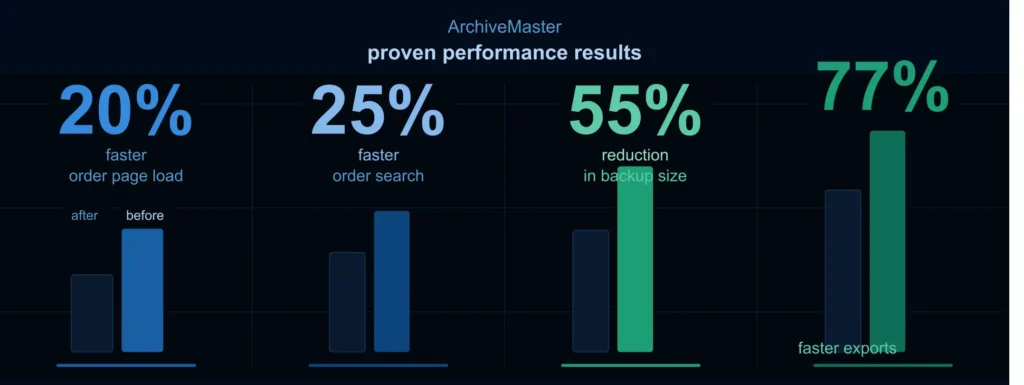
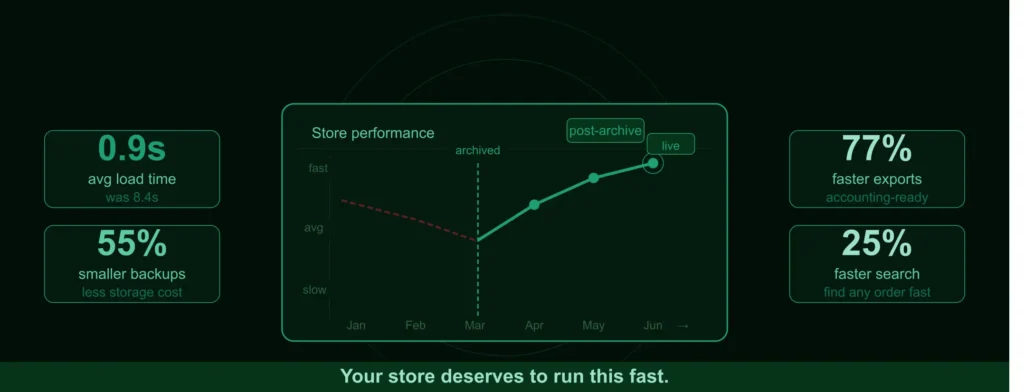
- Order pages load 20% faster
- Order searches are complete 25% faster
- Database backup size drops by 55%
- Order exports run 77% faster
These aren’t projections; they’re results store owners are seeing after archiving their old orders with ArchiveMaster.
What ArchiveMaster Can Do for Your Store
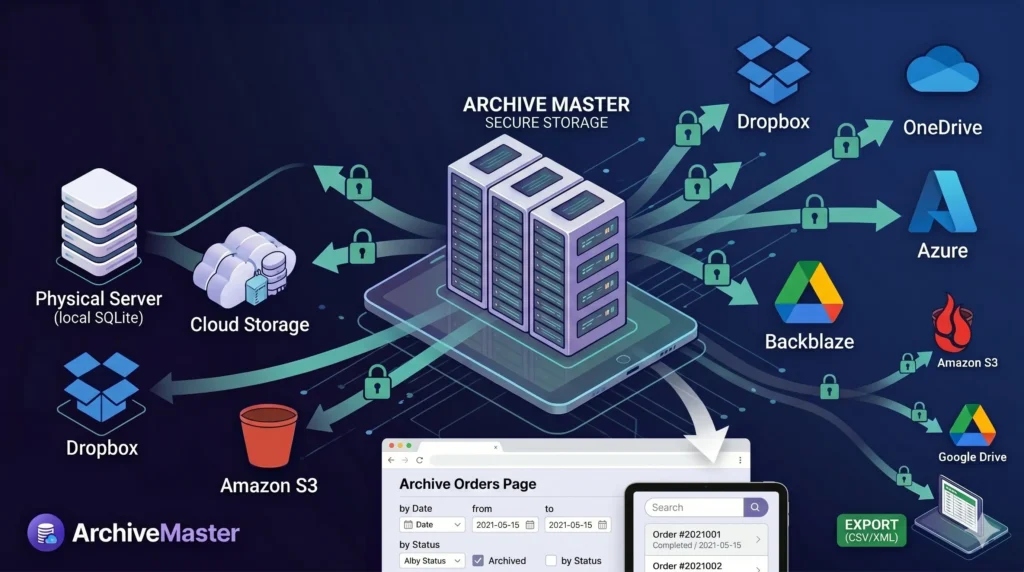
Let’s walk through how ArchiveMaster actually works, and what each feature means for your day-to-day.
Archive by date range, your rules, your schedule
You decide how far back to archive. Want to keep the last 15 days of orders active and move everything older? Done. Prefer 7 days, 1 month, or a fully custom range? All supported. ArchiveMaster gives you precise control so you’re never archiving orders you still need.
Auto-archive: set it once, forget it
Set an automatic schedule, daily, weekly, or monthly, and ArchiveMaster handles everything in the background. Your database stays clean without you lifting a finger. No manual exports, no reminders, no maintenance windows.
Local archiving: no external database needed
ArchiveMaster can archive orders to a SQLite file stored securely on your own server. It’s simple, fast, and requires zero external setup. For most store owners, this alone is enough to make a significant performance difference.
Cloud and remote archiving: for stores that need more
Need off-site storage? ArchiveMaster connects to Amazon RDS, Google Drive, Dropbox, OneDrive, Amazon S3, Microsoft Azure, Backblaze, Hetzner, and more. All transfers are encrypted. Access is restricted to authorized users only. Your records go exactly where you need them.
Your archived orders stay fully accessible
Archiving doesn’t mean losing access. From the Archive Orders page, you can search, filter, and view any archived order anytime. A customer asks about an order from two years ago. You’ll have it in seconds.
One-click unarchive,conflict-free
Need to bring orders back? Unarchiving is just as easy. ArchiveMaster handles the process cleanly, without conflicts or data issues. Your orders come back exactly as they were.
Export for accounting, audits, or reporting
Export archived orders in CSV, JSON, or XML,whatever format works best for your accounting software, your team, or your auditors. Your records stay useful long after they’ve been archived.
Status-based archiving with smart exclusions
Archive only specific order statuses, completed, refunded, cancelled, and automatically exclude active subscriptions or memberships. ArchiveMaster knows what to move and what to leave alone.
Who ArchiveMaster Is Built For
If your WooCommerce store has been running for more than a year and you’ve never archived your orders, ArchiveMaster was made for you. It’s especially useful for:
- Store owners with thousands of orders piling up in their database
- Teams that find the WooCommerce dashboard slow or hard to search
- Stores running frequent sales or promotions where peak performance matters
- Agencies managing WooCommerce stores that want a hands-off maintenance solution
- Anyone who needs clean, exportable order records for accounting or compliance
Try It, Your Store Deserves to Run Fast
You’ve put a lot of work into building your store. Don’t let old data drag it down.
ArchiveMaster takes minutes to set up and runs quietly in the background. Most store owners see a noticeable improvement in admin speed within the first archive run.
There’s a free version available, no credit card, no commitment. Install it, run your first archive, and see the difference for yourself.

Add your first comment to this post