









Great things move fast, especially when built around your feedback and trust.
Our goal has always been simple:
To make FormyChat not just your WhatsApp contact form plugin, but your complete lead nurturing ecosystem inside WordPress.
And this November, we’re kicking things off with something truly exciting: the first of many action-packed features we’ve been preparing for you.
Introducing FluentCRM Integration for Smarter Leads & Seamless Automation
You asked for better automation, smarter segmentation and deeper connections between your chats and campaigns.
We listened.
With the FluentCRM Integration, you can now send all your FormyChat leads gathered from WhatsApp or contact forms, directly into FluentCRM for advanced segmentation, email marketing and automation.
No copy-pasting. No manual exports. Just a smooth, automatic flow of leads straight into your CRM.
It’s the bridge between real-time conversations and long-term customer relationships.
What You Can Do With It
- Automate Your Follow-Ups: Trigger automation funnels in FluentCRM the moment a WhatsApp lead arrives.
- Segment with Precision: Organize leads by source, interest or page; all through your FormyChat fields and tags.
- Run Email Campaigns Effortlessly: Send newsletters, promotions and follow-ups directly from your FormyChat leads.
- Keep Data in Sync: Forget manual syncing. Everything stays updated in real-time between FormyChat and FluentCRM.
This integration transforms FormyChat from a simple contact tool into the frontline of your lead-generation system, where chats become relationships that convert.
How It Works: Simple, Seamless and Instant
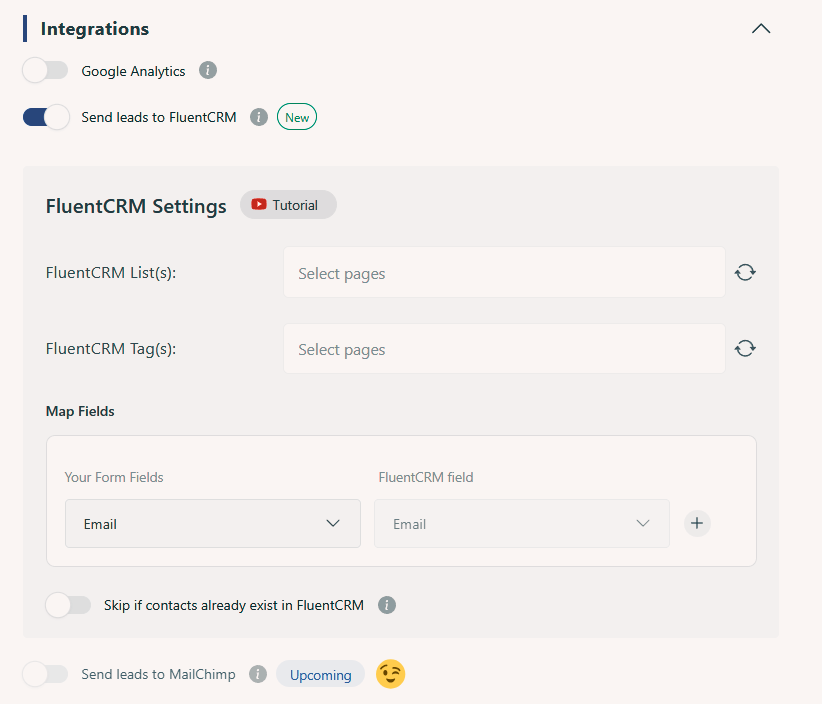
Setting it up takes just a few minutes:
- Make sure both FormyChat (Free + Ultimate) and FluentCRM are installed and active.
- In your WordPress dashboard, go to FormyChat → Integrations. Confirm FluentCRM is enabled.
- Edit your preferred widget → open the Triggers & Targeting tab → Integrations section.
- Toggle on “Send leads to FluentCRM.”
- Choose your FluentCRM List and assign Tags for segmentation.
- Map fields (Name, Email, Phone, Message) and click Save.
That’s it! Every submission from your FormyChat widget now instantly appears in both your:
- FormyChat Leads Dashboard
- FluentCRM Contacts.
Why It Matters
FormyChat has always been about connecting with customers where they already are, which is WhatsApp.
But every business needs more than just conversations; it needs continuity.
With FluentCRM, your WhatsApp leads don’t just stop at the chat. They become part of your automated growth system: tagged, segmented, nurtured and ready for conversion.
In short:
You start in WhatsApp, but you grow in FluentCRM.
💭 Is That All We’ve Got?
Trust me, we’re just getting started!
We know, not everyone wants CRM integrations. Some of you might prefer simple, straightforward documentation where your leads automatically go into a Google Sheet for easy tracking. Or maybe you’re a MailChimp user, excited to see your contacts sync directly with your campaigns.
Good news! You’re in luck.
Because as a team, we’re not just focused on building features.
We’re focused on building features that help you scale your business and meet your exact needs.
Curious to know what’s coming next?
Check out The November Heat of FormyChat. 👈
Don’t Miss What’s Ahead!
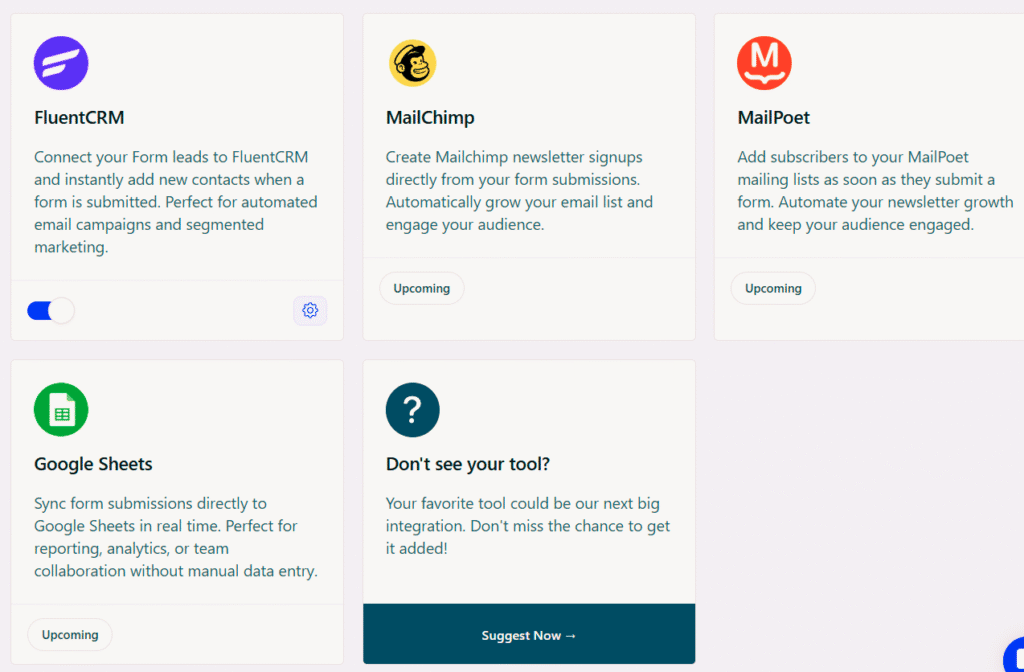
FormyChat’s new FluentCRM integration is more than an update; it’s a step forward in our shared vision: helping you connect, engage and grow smarter.
No extra setup. No complex configurations. Just smarter leads, right where you need them. This November is going to be packed with features built around you.
Stay tuned, the best is yet to come. 🙌


Add your first comment to this post