









WooCommerce gives store owners a powerful way to sell online, but not every customer is ready to complete a checkout the moment they land on a product page. Many want to ask quick questions first; about availability, delivery, customization or pricing – before making a decision.
That’s where WhatsApp-first conversations outperform traditional forms and email.
With the latest FormyChat WooCommerce integration, you can add a WhatsApp button directly to your WooCommerce shop and product pages and allow customers to start a conversation from the exact product they’re viewing. Instead of generic chats, these conversations can include pre-filled product details to make WhatsApp a practical extension of your WooCommerce store.
FormyChat remains a flexible WordPress chat plugin, but this release focuses specifically on improving how WooCommerce stores connect products with real customer conversations.
Why WhatsApp-First Ordering Matters for WooCommerce
For many WooCommerce stores, especially in chat-driven and cash-on-delivery markets, forcing users through a full checkout too early creates friction.
Customers often want to:
- Confirm stock or variants
- Ask about delivery timelines
- Request custom pricing or bulk orders
- Clarify return or warranty details
A WooCommerce customer chat plugin bridges this gap better than traditional contact forms. Compared to a standard WooCommerce contact form plugin, WhatsApp offers:
- Faster responses
- Higher open and reply rates
- Lower drop-off before purchase decisions
FormyChat’s WordPress WhatsApp integration is designed to support this natural buying behavior without replacing WooCommerce’s core functionality.
What’s New in FormyChat’s WooCommerce Integration
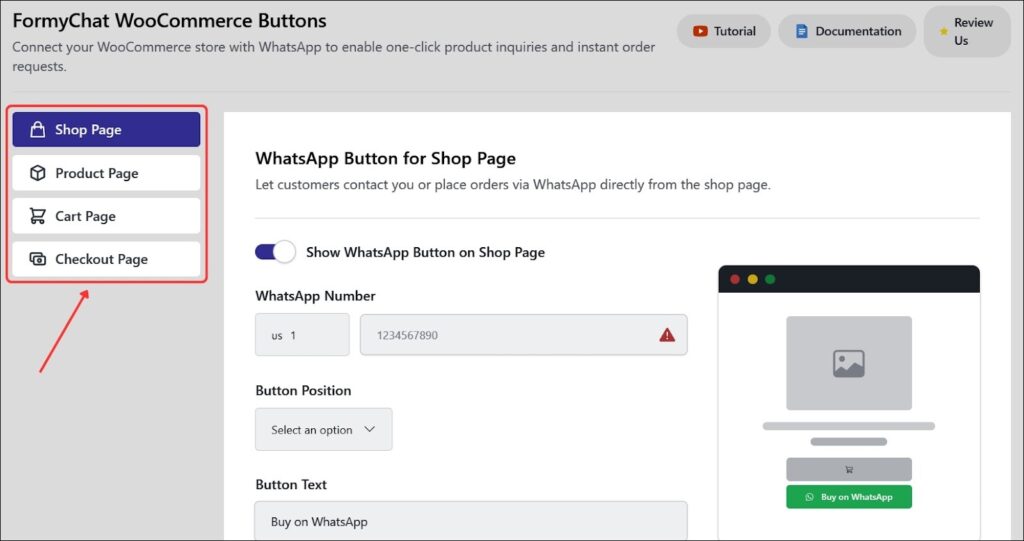
This release introduces WooCommerce WhatsApp buttons that can be enabled on:
- Shop pages
- Single product pages
Instead of a generic floating chat icon, the WhatsApp button becomes product-contextual. Customers click from a product they’re interested in and arrive in WhatsApp with relevant details already included.
This makes FormyChat more than just another chat plugin for WordPress. It becomes part of the WooCommerce browsing experience.
WhatsApp Button on WooCommerce Shop Pages
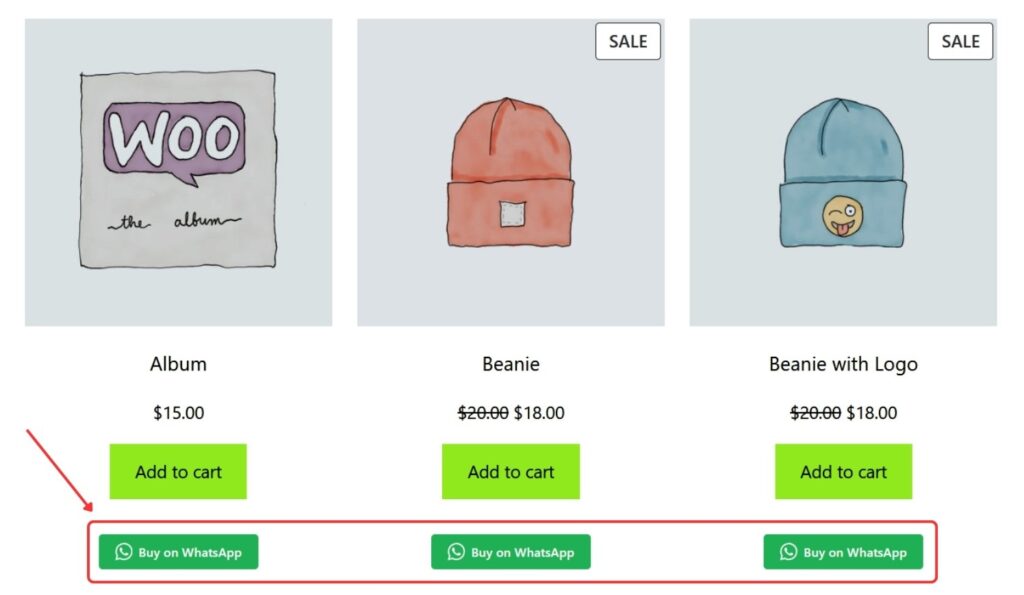
You can now display a WhatsApp button directly on WooCommerce shop pages, where products are listed.
This is especially useful for shoppers who:
- Browse multiple products quickly
- Want to ask questions without opening individual product pages
- Prefer messaging before committing further
From an SEO and UX perspective, this strengthens FormyChat’s positioning as a WooCommerce WhatsApp chat plugin, not just a site-wide chat tool.
WhatsApp Button on Single Product Pages
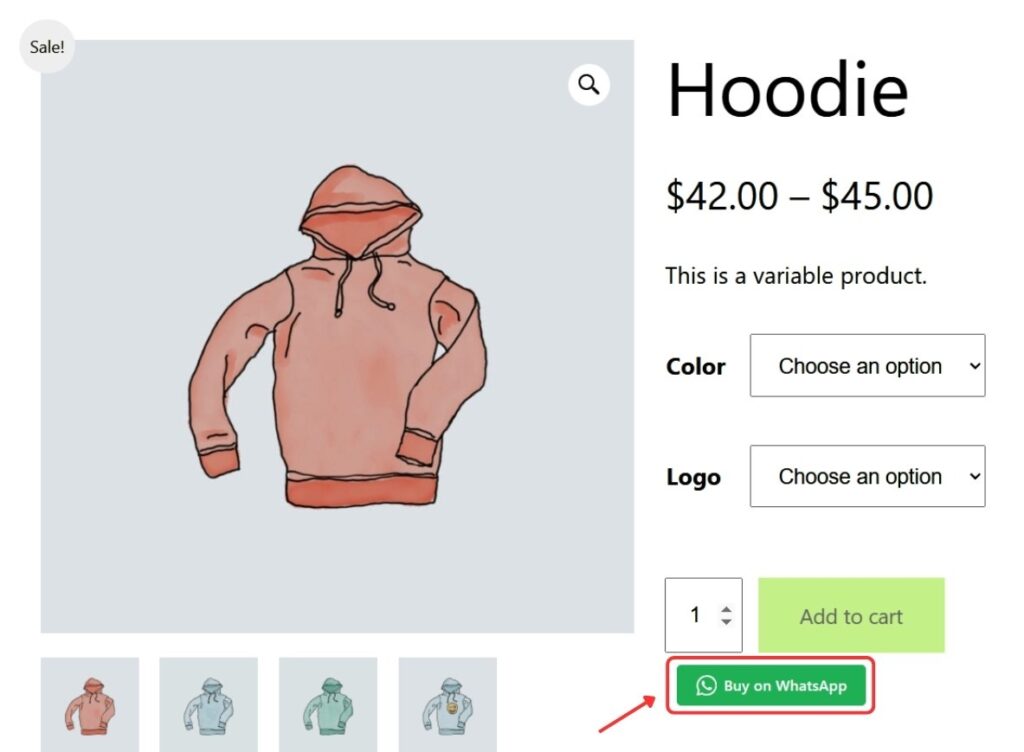
On single product pages, FormyChat adds even more flexibility.
The WhatsApp button can be placed in multiple product-specific locations, ensuring it fits naturally within your theme layout. This gives store owners better control compared to generic floating chat buttons commonly found in other WordPress live chat plugins.
For users comparing options, this contextual placement often feels more helpful and less intrusive.
Pre-Filled WhatsApp Messages with Product Details
This is where the integration truly stands out.
FormyChat allows you to create pre-filled WhatsApp messages using dynamic product data. When a customer clicks the button, the WhatsApp message can automatically include details such as:
- Product name
- SKU
- Price
- Stock status
- Product or page URL
- Site name, date and time
Instead of receiving a vague “Hi”, you receive a message that clearly references the product the customer is interested in. Functionally, this works like a WhatsApp order form for WooCommerce, but in a conversational user-friendly way.
This approach is particularly effective for stores that rely on quick clarifications before closing sales.
Optional: WhatsApp-Only Ordering (Hide Add to Cart)
FormyChat also supports stores that prefer a chat-first ordering flow.
You can optionally hide the default WooCommerce “Add to Cart” button and guide customers to WhatsApp instead. This setup works well for:
- Custom or made-to-order products
- Service-based WooCommerce stores
- Cash-on-delivery focused markets
This flexibility allows FormyChat to serve both traditional WooCommerce stores and WhatsApp-driven sales models without forcing one approach.
Styling, Placement & Device Control
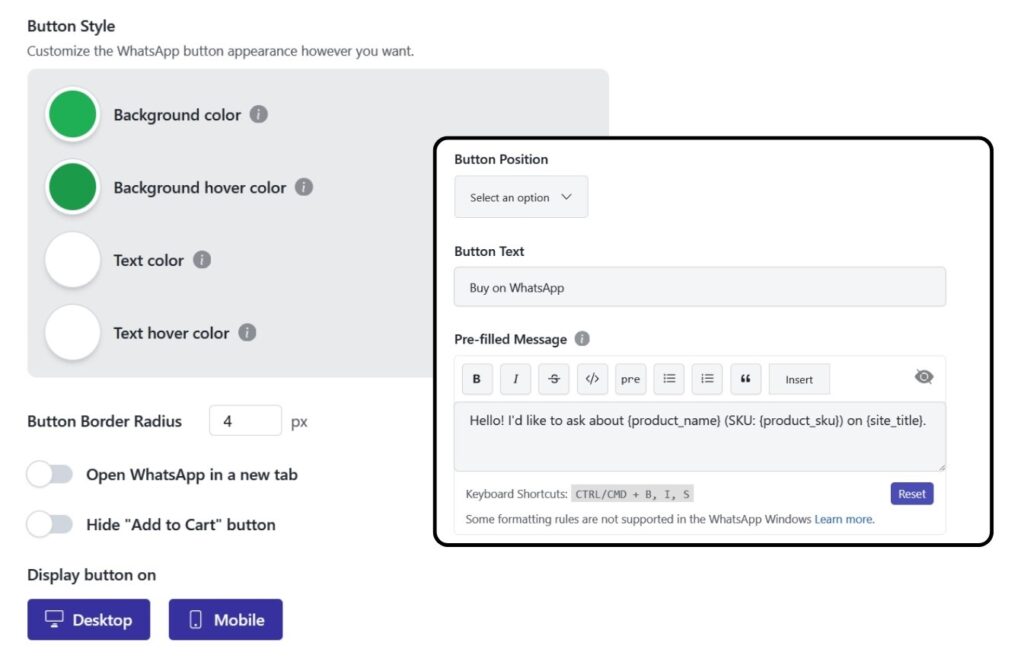
To ensure the WhatsApp button blends seamlessly with your store design, FormyChat includes controls for:
- Button text and labels (e.g., “Buy on WhatsApp”, “Chat to Order”)
- Background and text colors
- Hover styles and border radius
- Placement options depending on page type
- Device visibility (desktop and mobile)
These controls help maintain brand consistency while keeping the button visible where it matters most.
How to Enable the WooCommerce WhatsApp Button in FormyChat
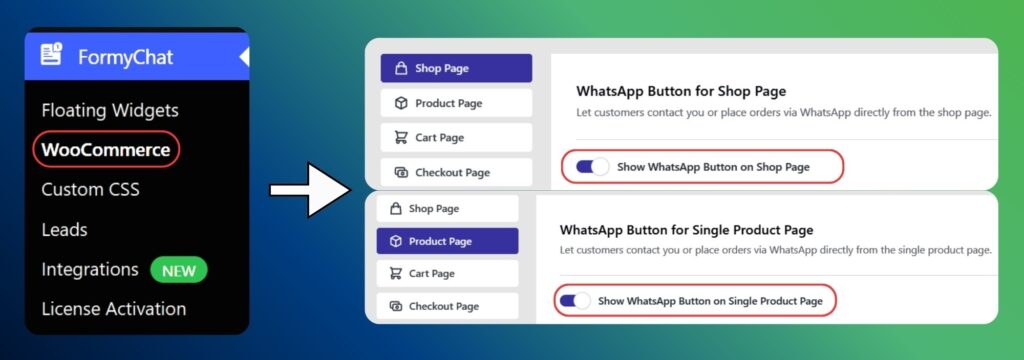
Enabling the integration is straightforward:
- Go to WordPress Dashboard → FormyChat → WooCommerce
- Enable the WhatsApp button for:
- Shop Page
- Product Page
- Set your WhatsApp number
- Customize button text and placement
- Configure your pre-filled WhatsApp message
- Adjust styling and behavior as needed
No complex setup or custom coding is required. 👉 Read the Full Setup Guide.
Use Cases Where This Integration Works Best
FormyChat’s WooCommerce WhatsApp integration is particularly effective for:
- High-intent products where one question can unlock a sale
- Custom pricing or bulk orders that need discussion
- COD and regional markets where WhatsApp is the primary sales channel
- Stock or availability inquiries before checkout
In these scenarios, a WooCommerce WhatsApp chat plugin often converts better than forcing users into forms or checkout flows too early.
What’s Coming Next 💭
The WooCommerce integration is actively evolving.
Upcoming enhancements include WhatsApp buttons for:
- Cart pages
- Checkout pages
These will further expand WhatsApp’s role across the WooCommerce purchase journey, while keeping the current implementation stable and focused.
In Case You Missed Recent Updates…
Mailchimp Integration (v2.13.0)
Added native Mailchimp integration to sync leads from FormyChat and improved field mapping with FluentCRM to avoid conflicts.
WooCommerce WhatsApp Integration (v2.14.0)
Introduced one-click WhatsApp buttons on WooCommerce shop and product pages, allowing visitors to start conversations with product details automatically included.
👉 View the complete FormyChat changelog
A Final Note from The Team
This release strengthens FormyChat’s position as a practical WordPress WhatsApp integration for WooCommerce stores, not just a generic chat solution.
By connecting products directly to WhatsApp conversations, FormyChat helps store owners:
- Reduce friction
- Capture clearer intent
- Start better sales conversations
Whether you’re looking for a lightweight WordPress chat plugin or a more contextual WooCommerce customer chat plugin, this integration gives you the flexibility to adapt WhatsApp to how your customers already buy.
Stay tuned, the best is yet to come! 🙌


Add your first comment to this post