









For many who run online shops, getting a steady flow of ongoing cash is the goal. Not like one-time sales, ongoing pay gives you sure money, money safety, and the sureness to plan for more big things.
If you run a WooCommerce shop, you’re already in a good place to start using this strong way to grow your shop. With liked tools like WooCommerce Subscriptions and the new, easy WPSubscription plugin, making your shop a sure source of ongoing cash is easy now.
In this guide, I’ll show you real, doable steps to help you up your ongoing cash using WooCommerce subscription tools.
Whether you sell digital goods, subscription boxes, club passes, advice, or things on a set time plan, these hints will help you make the most out of your subscription shop.
Why Focus on Recurring Revenue?
Before we talk about how, it’s key to know why steady money needs your focus. Here are some strong points:
Financial Predictability
With steady money, you know just how much cash will come in each month. This helps you handle cash flow well and cuts down worry over sales going up and down.
Improved Customer Lifetime Value
People who pay again and again tend to stay and spend more as time goes on. Regular payments help build strong ties and boost the total value from each customer.
Smoother Cash Flow
Not like one-time buys that may change, subscription cash comes in often. This regular flow makes it easy to plan for marketing, stock, and running things.
Greater Business Valuation
People who might put money in your business like it when cash comes in on a normal basis. Steady cash can make your company worth more if you want to sell or get funds from others.
Easier Forecasting and Planning
With cash from subscriptions, you can plan with confidence to grow, bring on more people, and put money into new things or services.
How WooCommerce Enables Recurring Revenue
Right from the start, WooCommerce is set up for one-time buys. However, with a good subscription plugin, it can turn into a great way to bring in money over and over.
These plugins make it easy to set up payments that happen on their own every week, month, or year. You can give out free trials, put in sign-up fees, group products together, and also make plans that customers can change up or down as they want.
Things like reminders to renew help cut down on people leaving and keep your money flow stable. With tools like WPSubscription, making your store into a subscription-based place is simpler than before.
Select the Right Subscription Plugin
Choosing the right payment tool is key to a steady income. WPSubscription is a rising, budget-friendly alternative to WooCommerce Subscriptions, offering smooth management, strong WordPress integration, and support for both digital and physical products.
It’s easy for customers to manage plans and is more affordable than many premium options, making it a smart pick for long-term growth.
Offer Subscription-Only Perks
Subscriptions get good when they have more than just repeat pay. Things like special price cuts for members only, first dibs on items, no cost shipping, or stuff just for them can make them stay and feel important.
Pick a tool that can handle these extras or works well with WooCommerce extras that can.
Create Flexible Plans
Your customers want different things and have different money to spend. Giving them many plan choices with different times to pay and different features will bring in more people.
For example, you could have plans like this:
| Plan Name | Billing Cycle | Features |
| Starter Month | Monthly | Cancel anytime, free trial, bonus content |
| Pro Quarter | Quarterly | Exclusive webinars, priority support |
| Annual Plus | Yearly | Biggest discount, free T-shirt, loyalty box |
Enable Simple Management for Subscribers
When people who sign up can take care of their own accounts, they don’t often quit. Tools like WPSubscription help by letting them see their plans, change things, update how they pay, and get reminders about money, all on their dashboard.
Letting users do this makes them happy and cuts down on how many leave.
Automate Communication and Reduce Churn
Clear, simple talk cuts down on lost customers and helps grow steady money flow. Auto emails, like renewal notes, payment info, and special messages, keep people who pay in the loop and involved.
Whether it’s cheering for big wins or giving unexpected gifts, these small acts make them stay loyal and save you time.
Bundle Products and Services
Putting more items or services in your plans makes them worth more and ups the usual buy size. Be it in monthly boxes or sets of online stuff, giving more in one pack makes plans look better.
It even lets you sell more things when folks sign up. A great tool can help you handle this well, adding to both happiness and cash flow.
Allow Plan Customization and Membership Integration
If you sell memberships or locked content, linking these to user roles is important. Doing so lets you keep non-paying members out, set roles on their own, and handle special content easily. WPSubscription does this well.
It changes roles when memberships begin or stop. This makes handling memberships easy and quick.
WPSubscription Plugin: A Deep Dive
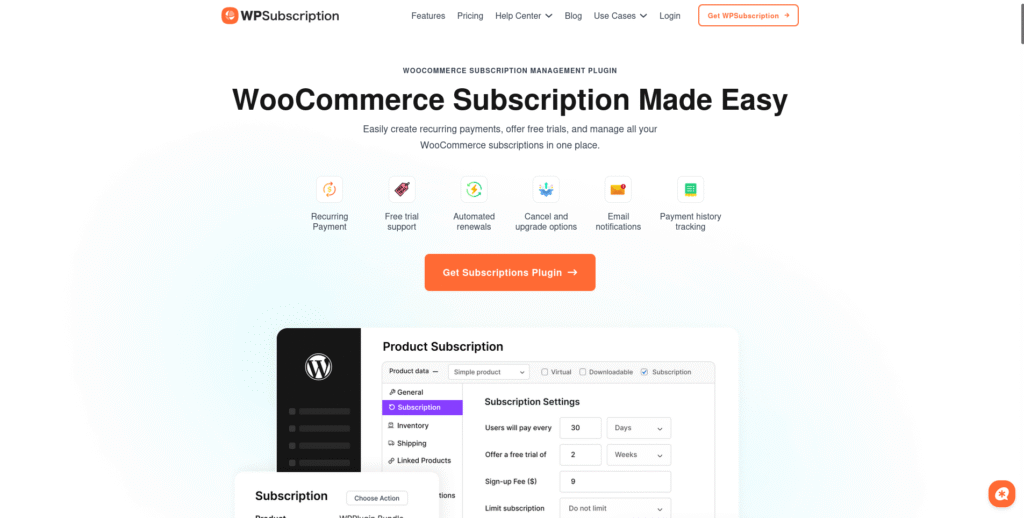
WPSubscription gives a strong fix for WooCommerce shops that want to raise money over time. Let’s look deep into its main good parts and things it can do.
Key Benefits
- User-Friendly Experience: Users have a “Subscriptions” tab in their WooCommerce accounts to see plans that are active, when to pay, and can easily stop or start them again.
- Admin-Focused Tools: Shop bosses can see all plans in one spot, can give or end plans by hand, and look at deep money guesses to make smart choices.
- Role Management: Set up user role shifts to fit well with plugins for members or locked content. Ideal for online classes, groups, or top memberships.
- Reporting: Quick views show how many subscribers, the money per month, and what to expect for growth.
- Affordable Alternative: WPSubscription has many of the same things you see in costly plugins like WooCommerce Subscriptions, but at a better cost.
- Reliability: Built to deal with both things you can touch and ones you can’t, works with big payment ways, and fits most WooCommerce looks.
Minor Drawbacks
- The boss side might look a bit full with lots of menus, but this is a small problem that should get better with updates.
- WPSubscription isn’t the whole way to limit content by itself, so for deep content locking, using it with a focused member add, on is wise.
YITH WooCommerce Subscription: Another alternative
YITH WooCommerce Subscription is a top pick for adding regular pay plans to WooCommerce stores. You can get it in free and paid forms. Here’s why it shines:
- Easy Plan Making: It lets you set up plans for simple, non-physical, or things you can download. You can set bills to be daily, monthly, yearly, or your own choice.
- Set-and-Forget Renewals & Try-Outs: It renews by itself, lets you have free or paid try-outs, and handles bill payments well.
- Power to the Customer: Customers can stop, start, or cancel their plans on their own. They can also look at and manage their current plans in their WooCommerce account.
- Tools for Owners: Store owners can see all plans, ask for renewals by hand, stop/start plans, and move data to a CSV file.
- Works Well With Others: It works with big payment methods (like PayPal, Stripe, Authorize.net). It also supports many languages, many types of money, and other YITH add-ons.
- Fair Prices: The free version covers basic needs, and the paid version at $199/year gives you more features.
- Limits: Some of the best parts (like hand-made plans, moving data, and deep reports) are only in the paid version.
WooCommerce Subscription Plugins Compared
| Feature | WPSubscription | WooCommerce Subscriptions | YITH WooCommerce Subscription |
| Recurring billing cycles | Yes | Yes | Yes |
| User self-management | Yes | Yes | Yes |
| Manual admin control | Yes | No | Yes (premium) |
| Revenue & subscriber reports | Built-in | More advanced | Basic (premium: CSV export) |
| User role integration | Yes | Limited | Via membership plugins |
| Support for digital & physical | Yes | Yes | Yes |
| Payment gateways | Stripe, PayPal, others | Stripe, PayPal, many | PayPal (free), Stripe, others (pro) |
| Pricing | Affordable | Premium | Free/basic, $199/year premium |
| Membership/content restriction | Basic (via roles) | Requires external plugin | With YITH Membership add-on |
| Unique perks | Manual assign/cancel | Advanced reporting | Subscription box, CSV exporting |
Five Quick Tips to Maximize Your Recurring Revenue
- Begin with an Easy, Top Offer: Start by selling your most popular item as a repeat buy, and later add more sets and extra treats.
- Use Free Trials and Entry Discounts: Make it easy to join and give buyers a taste of worth before they say yes to buy.
- Communicate Clearly: Terms show when bills are due and how often, and what they get from the subscription. Make this clear at payment time to gain trust.
- Continuously Analyze and Adapt: Keep looking at your reports and what buyers say to cut down on quits and up the value.
- Nurture Subscribers: Give out regular news, extra gifts, and say thanks in a way that feels real to keep them close and keep them coming back.
How to Set Up Subscriptions with WPSubscription
Getting started with WPSubscription is straightforward:
- Install and Activate: Download WPSubscription from the WordPress repository or your purchase source and activate it.
- Configure General Settings: Set default billing cycles, connect payment gateways, and customize email notifications.
- Add Subscription Products: Edit any WooCommerce product and enable subscription options. You can create simple or variable subscriptions and bundle multiple products.
- Set Up User Roles: Assign user roles for memberships or gated content if needed.
- Customize Plan Options: Add free trials, sign-up fees, order limits, and set plan durations.
- Test the Subscription Flow: Buy a test item, check the sub board, and try to stop or start again to make sure it all works well.
WPSubscription also gives you short codes to show sub tables, account boards, or sub boxes all over your site. Full guides and help from the team are there to help you set up and make it better.
Real-World Use Cases
Subscriptions help many types of businesses. Here are some ways they are used in different fields:
- Online shops send out boxes every month, refills, or special items. They use auto pay and keep track of stock.
- Trainers and web teachers have big courses, shared classes, or sets of tools that you pay for again and again.
- Groups with membership sites control who gets into chats, lists, and extra stuff by linking rights to subscriptions.
- People who make content online make money from emails, shows, or special files by giving access only to subscribers.
Final Thoughts
Raising your repeat cash flow with WooCommerce sub tools is not just for big shops now. Even if you are kicking off a small gig or growing a full, on-trade business, the top sub tool can change a lot. WPSubscription stands out as a simple, easy, and cheap way to win.
By choosing the best tool, offering good deals, making plans that can change, growing your fan base, automating chats, grouping products, and adding memberships, you can create a strong, steady flow of money to change your online store.
Ready to take your recurring revenue to the next level? It’s time to find the best WooCommerce subscription tool for your needs and start to rise with sure steps.

Add your first comment to this post