









From the beginning of 2019, we have seen the start of the Dark Mode trend on most of the websites. Google first introduced it on many of its apps, from Chrome to YouTube.
And we can see the craze for the dark mode that is continuing in 2026 as well. According to statistics, 70-85% of internet users prefer dark mode.
In hindsight, it may seem that it doesn’t affect much. However, a dark mode has its benefits and enhancements over the traditional light mode. Let’s be honest first, dark modes are fantastic! They’re stylish, dramatic, and elegant.
So, today we will explore the key dark mode trends in 2025 and 2026, and how they benefit users.
The Dark Mode Trend, is it Really Effective?
If you want a one-word answer as to why the Dark Mode is effective, then the answer is it makes your content easy to read. If you are looking to make your website content, especially those are dynamic like blog posts, as readable as possible.
And if you give your readers the option for Dark Mode, it will provide a stimulating experience for them. That’s why the Dark Mode trend has picked up so much attention. Also, the Dark Mode feature,
Improves Readability of the Texts
The use of flashy colors slows down the readability of the people as they are often get thrown off by them. Moreover, when people read, they want fewer distractions. And Dark Mode provides that.
When you put up content for your users, you want your readers to spend more time reading that. The Dark Mode does exactly that.
The interesting fact is, the white texts in the darker background keep people’s concentration intact, increasing engagement.
Easy on the Eyes
Another reason for the start of the Dark Mode trend is it is visually comforting. When people work on their devices at the night, the bright colors really cause an effect on the eyes.
However, because of the darker background, the eyes get the necessary rest they need. The change from white to black background causes a reduction in ocular effort.
Also, when the white flashes decrease, it allows the eyes to adapt better to surrounding environment and decreases the fatigue.
Dark Mode and Accessibility
So far, we have talked about how Dark Mode can be great for your users. But here is something most people skip over: making sure your dark mode design actually works for everyone, including people with visual impairments.
This is where WCAG comes in. WCAG stands for Web Content Accessibility Guidelines, and it is basically the global standard for making websites usable for all kinds of people. If your dark mode design does not follow these guidelines, you could be accidentally making your site harder to use for a big chunk of your audience.
Increases Conversion Rate
Yes, you heard it right. All the website owners are looking for ways to increase the conversion rate of their websites. Because of Dark Mode, people are spending more time reading your content, learning more about your product(s), and getting more interested.

And at the end of the day, they are increasing your conversion rate. How cool is that?
Most of all…Saves Battery Life
Nowadays, people are spending more and more time on smart devices. So, obviously, they are looking for ways to reduce the use of the powers for their devices.
And it turns out, the Dark Mode background can help save a lot of power. Devices that have an OLED display will turn each pixel on and off, so pixels that are black draw no power. Using more black pixels on OLED displays can have a measurable impact on power usage.

Dark Mode can indeed reduce the display power draw by up to 58.5% at full brightness for the set of popular Android apps. In terms of whole phone battery drain reduction, that translates into 5.6% to 44.7% savings at full brightness and 1.8% to 23.5% savings at 38% brightness.
As you can see, the Dark Mode trend was not just hype. It is for real. That is why if you want to use Dark Mode, it should be under these situations,
- To save readers battery life and, in essence, the environment
- When the design is minimalist
- When it is appropriate for the context and use – take Netflix for example
- To reflect an emotion – for example, a feeling of intrigue and mystery
- Create a striking and dramatic look
- To create a sense of luxury and prestige
However, you need to avoid using Dark Mode when,
- There is a lot of text (reading on a dark background can be difficult) – that’s why an option to switch between light and dark is good
- There is a lot of mixed content on the screen
- The design calls for a wide range of colors
- Online stores should avoid it unless it fits the branding
- Your brand/industry wants a ‘light and fresh’ feel.
Now, after hearing all these things about Dark Mode and its trend, you must be curious about knowing how to enable Dark Mode for your website right? Don’t worry, we are here to answer that as well.
Dark Mode Trends: Adoption and Usage Statistics in 2025 and 2026
Dark mode has moved well beyond a design preference. According to a 2024 survey by Earthweb, 82% of smartphone users now have dark mode enabled, making it one of the most widely adopted display settings in mobile history.
At the app level, industry data cited by Gitnux suggests 90% of the most popular apps now offer a dark mode option. Dark mode has become a standard user expectation across productivity tools, social media, and gaming platforms alike.
For website owners and designers tracking dark mode usage statistics in 2025 and 2026, the numbers point in one direction: user preference has already made the decision. The question is whether your site is keeping up.
Dark Mode Dashboard and Web Design Trends in 2026
On the developer side, the adoption signal is equally clear. Data from Google’s web.dev showed that as of late 2021, 22% of global web traffic came from users with the prefers-color-scheme: dark setting active, a figure that has grown significantly since then as browser and OS-level dark mode defaults have become more common.
Some of the clearest dark mode web design trends in 2025 and 2026 are visible in dashboard and data-heavy interfaces. Analytics platforms, trading dashboards, and project management tools have adopted dark UI design as a default, citing better data readability and reduced digital eye strain during extended sessions. Gaming websites and creative tech brands have similarly embraced the look for its high-contrast, premium aesthetic.
For WordPress site owners looking to follow dark mode website trends in 2026, the practical first step is confirming your setup works correctly. It is worth reviewing dark mode compatibility with your active theme and plugins before implementing.
Enable Dark Mode in WordPress
As you know WordPress is the most popular CMS system globally. 48% of the web is made of WordPress. At first, you could create only blogging sites. But now, you can create any kind of website thanks to thousands of plugins and themes.
You will find a plugin for everything in the WordPress repo. And yes, you can find a plugin that will give the Dark Mode effect to your website. And that plugin’s name is WP Dark Mode.
It has features like,
- AI-Powered Color Preset Generator
- 24+ Floating Switch Styles
- 16+ Dark Mode Color Schemes
- AI-Powered Social Share Buttons
- Keyboard Shortcut Support (Ctrl + Alt + D)
- Dark Mode Analytics Feature
- Performance Optimization Options
- Dark Mode-Based Image Support
- Use Custom Dark Mode Colors
- WordPress Post Editor in Dark Mode
- Customize Each Element As You Want
- All Major WordPress Themes Supported
- Dark Mode-Based Custom CSS
- Dark Mode Switch in Menu
- Change Background Image & Video Based on Modes
- Dark Mode Logo Support
- Time-Based Dark Mode
- Dark Mode Switch Shortcode
- Place Switch Above Post/Page Content
- Excludes Pages from Dark Mode
- Excludes Elements from Dark Mode
You can easily give your user the option to add Dark Mode feature to their website using this ultimate Dark Night plugin.
And it is very easy to use.
Giving Your Website The Dark Effect
Step 1: Installing Dark Mode to WordPress Site
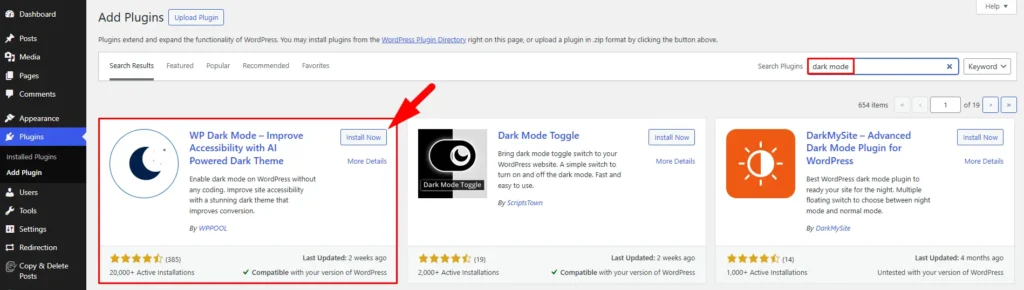
Installing WP Dark Mode is just like installing any other WordPress plugin. Just login to your WordPress site. Go to Dashboard > Plugins > Add New. Search WP Dark Mode, then Click Install and Activate subsequently.
Step 2: Add Dark Mode to WordPress Site in the Settings
By installing and activating WP Dark Mode, you have already set up dark mode on your website frontend.
Navigate to WP Dark Mode > Settings. Under Controls, you can enable/disable frontend dark mode, decide to have a dark mode switcher button, and enable and disable OS aware dark mode.
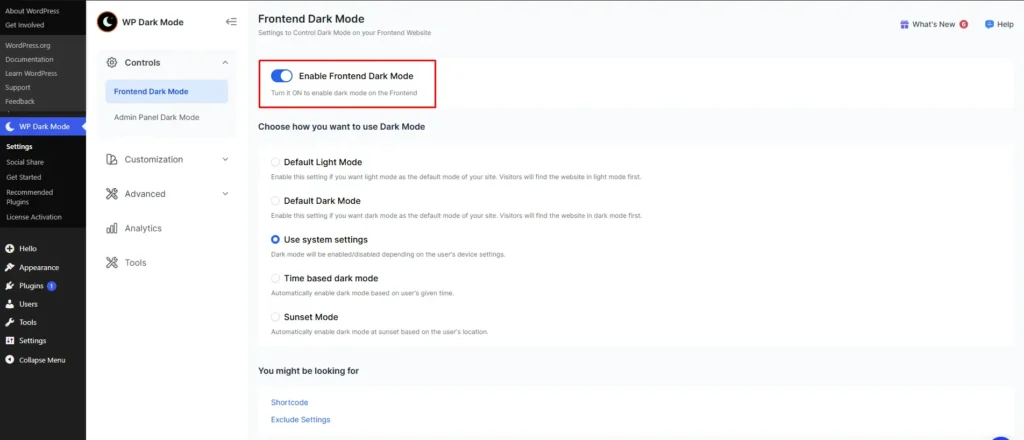
With this tweak in the settings, you are completely done with adding a dark mode to your WordPress site.
Step 3: Add Dark Mode to WordPress Admin Dashboard (Backend)
You can easily give your admin dashboard the dark mode feature using this plugin. And it is very easy to do.
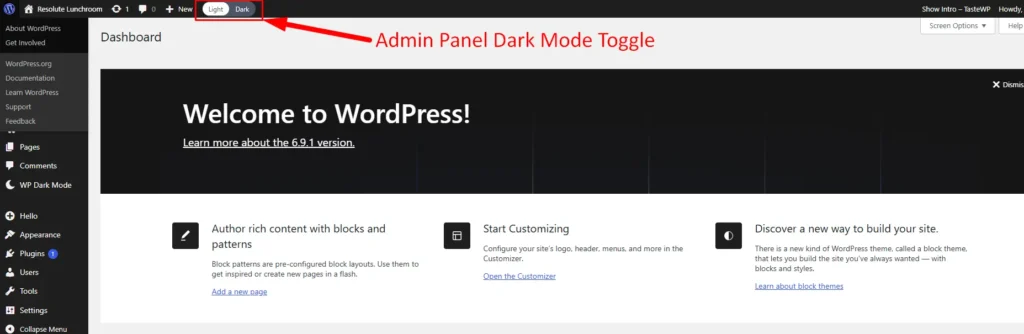
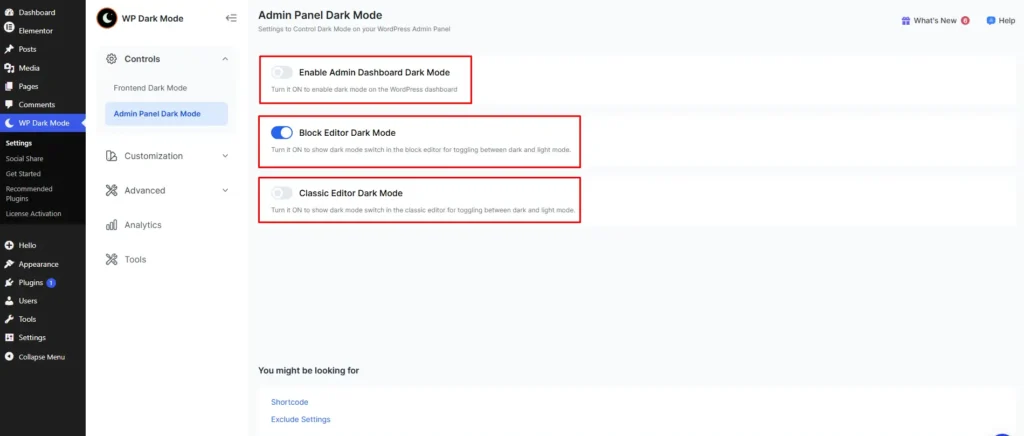
Go to Settings > WP Dark Mode.
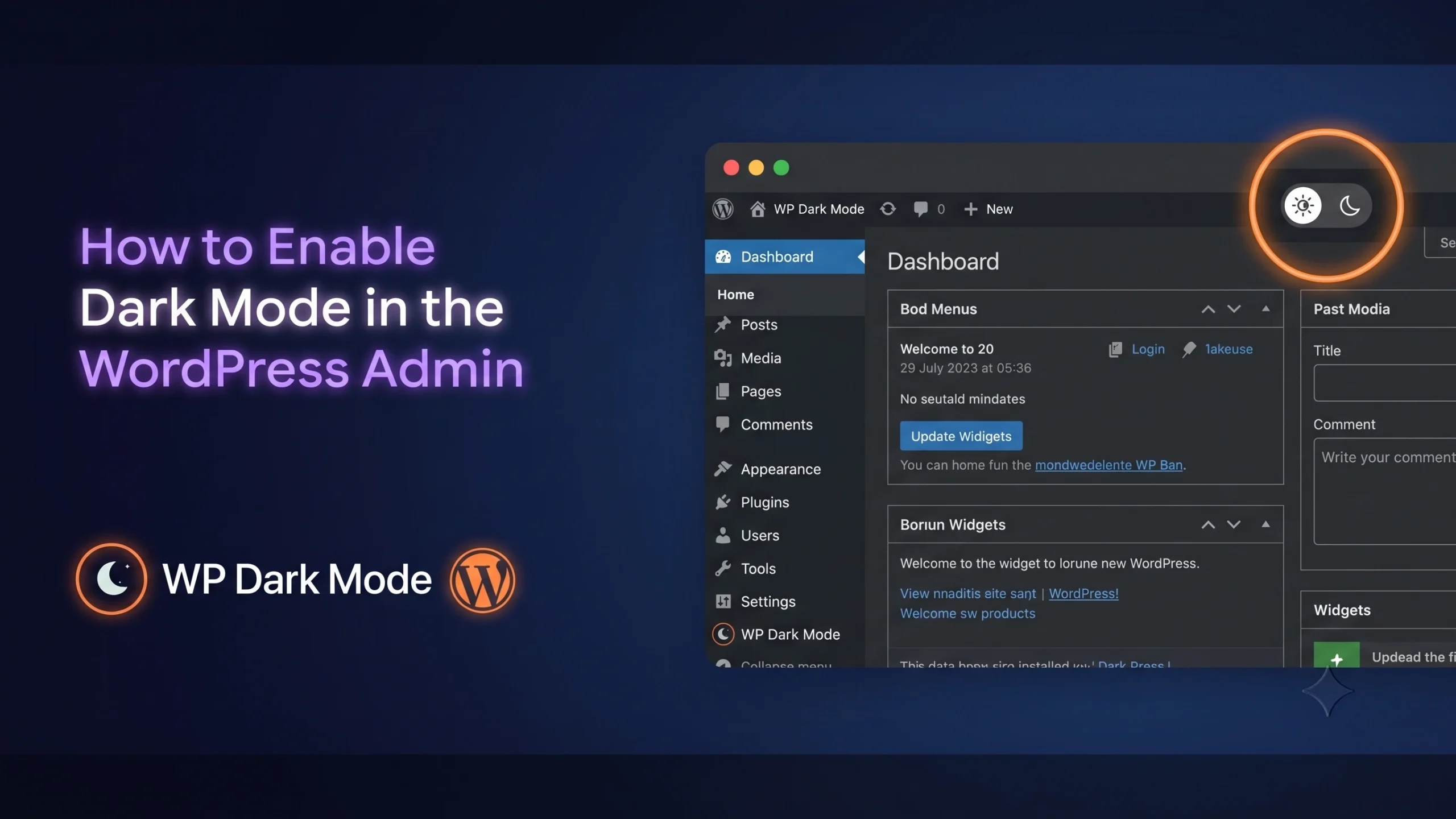
Under Controls, you will find the Admin Panel Dark Mode option. From there, if you enable the Admin Dashboard Dark Mode option, you will see a dark mode switch button in the backend admin bar.
Now you can switch to light and dark mode on your admin dashboard with just a simple click.
Wrapping Up
The dark mode trends of 2025 and 2026 confirm that this is no longer a passing phase. It is a design decision that improves readability, reduces eye strain, saves battery life, and even boosts conversions. And the best part? You do not need to be a developer to bring it to your website.
With a plugin like WP Dark Mode, the entire process is straightforward and beginner-friendly. Whether you are building with Elementor, Divi, or any other popular page builder, WP Dark Mode works seamlessly across all of them. From floating switch styles to time-based dark mode and accessibility-ready contrast settings, everything you need is already built in.
So if you have been thinking about giving your website that sleek, modern dark experience, now is the perfect time to make the move.
To learn more about WordPress dark mode, check our comprehensive guide.
Frequently Asked Questions
Is dark mode better for your eyes?
Dark mode reduces bright light emitted by your screen, which helps lower eye strain, especially in low-light environments. That said, it works best when the contrast between text and background is balanced rather than using pure black and white.
Does dark mode actually save battery life?
Yes, but only on devices with OLED or AMOLED displays. On these screens, black pixels draw zero power, which means dark mode can reduce display power usage by up to 58.5% at full brightness. LCD screens will not see the same benefit.
How do I add dark mode to my WordPress website?
You can add dark mode to your WordPress site using the WP Dark Mode plugin. Just go to Dashboard, search for the plugin, install and activate it, and manage all your settings from the plugin panel. It takes just a few minutes to set up.


Add your first comment to this post