









On August 6, 2026, six of our plugins were closed by the WordPress.org Plugin Directory for guideline violations. The closure notices landed within hours of each other. Each listed a different combination of issues, all flagged by the same hybrid system that combines automated AI scanning with human volunteer review.
Over the next 25 days, our team worked through more than 30 emails across several documented plugin threads. We fixed vulnerabilities, restructured how we build the freemium layer of our plugins, and pushed back on two automated findings we believed were incorrect.
This post covers what the WordPress.org team found in each plugin, how we worked through multiple rounds of back-and-forth to fix it, and the security checklist we now run before every release.
We are sharing this because the gaps we found are not unique to us. If you build WordPress plugins using common freemium patterns, some of what is below probably exists in your code.
How WordPress.org Plugin Reviews Work Today

The Plugin Directory uses a two-stage process. Automated scanners run first, checking the full plugin codebase and flagging potential violations. Human volunteers from the Plugins Team then read those findings, verify the serious ones, and decide whether a plugin stays open or gets closed.
Findings from the AI-assisted scanning layer are marked clearly in every review email. Human reviewers see everything before action is taken. The team is transparent about this in each message they send.
According to a May 2025 update from the WordPress Plugins Team, the Plugin Check tool has been integrated into the directory’s review workflow since September 2024. That integration reduced issues at the point of approval by 41 percent. The same tool is available for developers to run locally before submission.
Critical process detail: When you resubmit after making fixes, the team reviews the entire plugin again, not just your changes. This means partial fixes will not pass, and new issues can surface in a second review even if your original fixes were correct. Every round resets to a full audit.
Each re-submission requires a new version number in the plugin header, an updated Stable Tag in the readme.txt, and a fresh commit to both trunk and a new tag folder in SVN.
The Challenges We Faced
The sheer scale was the first problem. Six plugins closed on the same day meant six separate email threads, six distinct codebases to audit, and six concurrent fix cycles, all under a 60-day deadline before the closures became public as “Guideline Violations.”
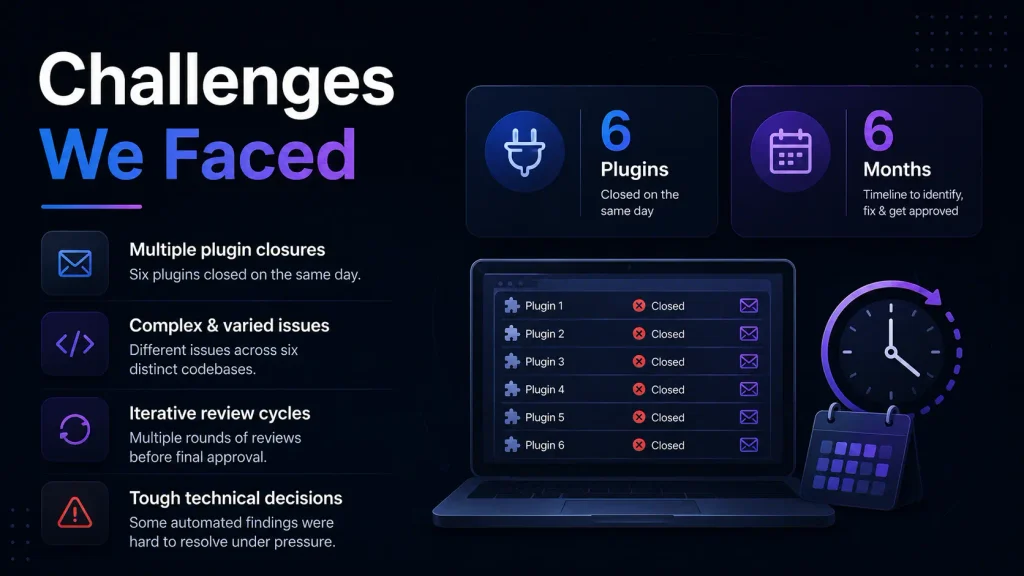
Each plugin had a different mix of issues. Some violations were shared across the portfolio because they came from shared third-party libraries or common architectural patterns. Others were entirely plugin-specific. Coordinating which team fixed which plugin, tracking each thread separately, and ensuring fixes did not introduce new issues required careful internal management.
The iterative review cycle added pressure that is easy to underestimate. After each resubmission, we had to wait for the team to review the full plugin before knowing whether we had cleared everything. New findings could appear in a second review that had not been flagged in the first. For FlexTable, this happened across four separate review rounds.
Two automated findings in FlexTable looked incorrect to our engineers. One concerned the structure of our rate-limit transient. The other flagged our AI summary caching implementation. Deciding whether to change working code to satisfy an automated scanner, or to push back and request human review, was not a straightforward call while under time pressure.
What the WordPress.org Team Found
Every affected plugin shared one violation: Guideline 5, Trialware, meaning locally implemented features were locked behind a Pro license check.
Beyond that common thread, each plugin had its own set of issues, and all of it needed fixing.
How We Collaborated With the Review Team
The relationship with the WordPress.org review team was constructive and professional throughout. Every closure notice included specific file paths, line numbers, and code excerpts for each finding. The feedback was detailed and actionable, even when the volume of issues in a single email was significant.
Our standard pattern across every thread was to read the full email, run a complete codebase audit using Plugin Check and PHPCS with WordPress Coding Standards on top of the flagged items, fix every issue found in both the review and our own audit, test activation on a clean WordPress install with WP_DEBUG enabled, upload a new version to SVN, and reply concisely to the thread.
We deliberately kept our replies short. The team reviews the entire plugin on every round, so listing every change in the email is unnecessary and adds noise. We flagged only things that needed clarification or where we had a specific question.
For the disputed findings, we wrote a clear technical explanation in the reply thread. We asked explicitly for a human reviewer to look at the findings before we changed anything. The human reviewer agreed with our assessment. The changes were not required.
What worked: When you disagree with an automated finding, write a specific, calm technical explanation.
Name the exact data flow. Ask for manual review. Do not silently change working code to satisfy a scanner you believe is wrong.
The Structural Decision: Rebuilding the Freemium Model
The trialware violation required more than a code fix. It required rethinking how we build the free and paid split.
Our previous approach was to ship one plugin file containing all the code, and use an is_pro() check to control what free users could access. This is a common pattern in the WordPress plugin ecosystem. It is also a Guideline 5 violation.
WordPress.org’s position is unambiguous: every line of code in a plugin hosted in the directory must work without a license key, a payment, or any external unlock mechanism. If the feature exists in the file, the user must be able to use it. Shipping locked code is trialware regardless of whether the intent was to give users a preview of what they were missing.
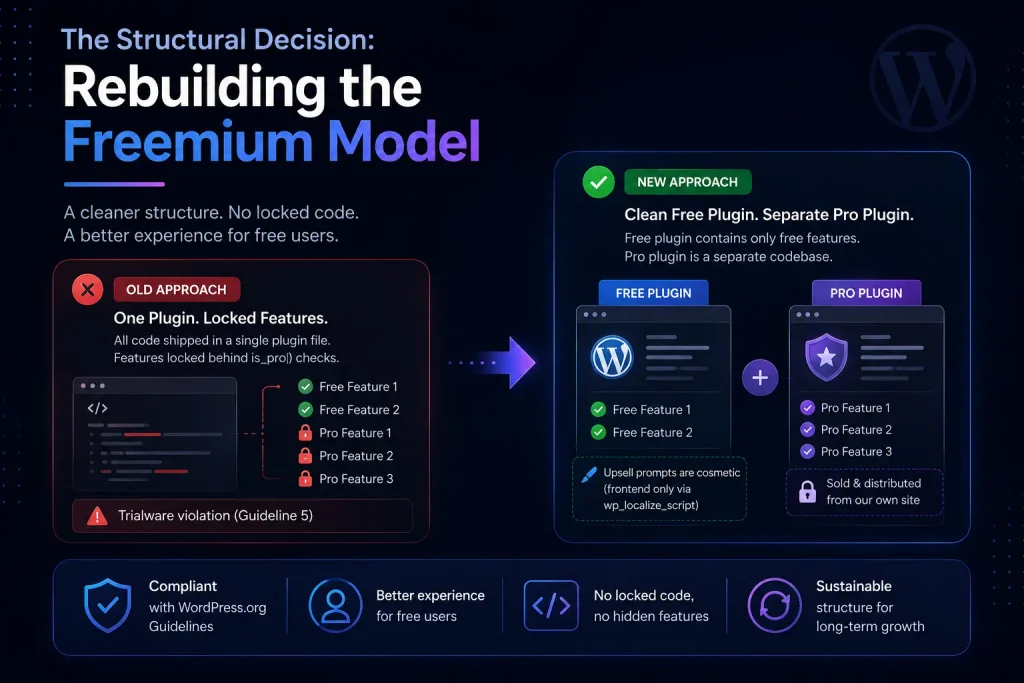
Our new structure keeps the free plugin clean. It contains only free features and no Pro code. The Pro plugin is a separate codebase, sold and distributed from our own site. Any upsell prompts in the free plugin are purely cosmetic, delivered through wp_localize_script to the frontend. No backend check gates any functionality in the free version.
This requires more effort to maintain. Two codebases instead of one, coordinated release cycles, and more deliberate thinking about where feature boundaries sit. It removes an entire category of potential violations going forward and gives free users a cleaner experience because they never encounter UI for things they cannot access.
WordPress Plugin Security Best Practices: 7 Point Pre-Submission Checklist
This checklist covers every violation category that appeared across our four plugins. Run it before every SVN submission.
1. Freemium Architecture
| ✓ | The free plugin contains only free features. No Pro code is included in the WordPress.org version. |
| ✓ | Paid features live in a separate plugin distributed outside WordPress.org. There is no is_pro() or license-gate check controlling local functionality in the free plugin. |
| ✓ | Any upsell UI is cosmetic only, delivered via wp_localize_script, with no backend enforcement. |
2. External Services
| ✓ | Every external call is documented in an “External services” section in readme.txt: what the service does, what data is sent and when, and links to its Terms of Service and Privacy Policy. |
| ✓ | This applies to third-party libraries you bundle, not just your own calls. Appsero, Headway, icanhazip.com, IPify, and similar tools that make their own external calls must all be disclosed. |
| ✓ | Analytics and tracking tools are opt-in by default, not opt-out. Verify that opting out stops all external contact, including “skipped” notification requests. |
| ✓ | No JavaScript or CSS assets are loaded from remote CDNs. All assets are bundled locally, including assets from third-party libraries you use. |
| ✓ | Changelog widgets, help doc iframes, and similar tools do not auto-load on admin pages without explicit user consent. |
3. Input Sanitization and Output Escaping
| ✓ | Every AJAX handler follows this exact order: verify nonce → check current_user_can() → sanitize inputs → do the work → escape outputs. |
| ✓ | filter_input() is never called without a sanitizing FILTER_ constant. FILTER_DEFAULT does not sanitize anything. |
| ✓ | json_decode() output is sanitized before storage or use. Decoding is not sanitizing. |
| ✓ | Shortcode callbacks escape all dynamic values before returning HTML. Spreadsheet data, post meta, and option values from the database are all treated as untrusted on output. |
| ✓ | Escaping is applied at the point of output, not at the point of storage. Both steps are required. |
4. Security Architecture
| ✓ | Every AJAX handler has both a nonce check AND a current_user_can() capability check. One without the other is insufficient. |
| ✓ | No unauthenticated AJAX endpoint triggers privileged actions such as installing, activating, or deactivating plugins. |
| ✓ | Dynamic method dispatch (calling methods based on user-supplied input) uses an explicit allowlist of permitted method names. |
| ✓ | WordPress core files are loaded with require_once or include_once, never with plain include or require. |
| ✓ | Every PHP file that contains executable code has if ( ! defined( “ABSPATH” ) ) exit; at the top. |
5. Code Quality and Libraries
| ✓ | All third-party libraries are on their latest stable release. Release candidate versions are not permitted. |
| ✓ | Composer dependencies are namespaced to avoid conflicts with other plugins loading the same library. |
| ✓ | Minified or compiled JavaScript has a public source repository link in the readme.txt. The repository must be publicly accessible and will be checked. |
| ✓ | composer.json is included in the plugin if Composer is used. |
| ✓ | Text domains match the current plugin slug exactly, across every file including bundled libraries and SDKs. |
| ✓ | gettext functions use string literals as the text domain parameter, never variables or constants. |
| ✓ | All function names, class names, AJAX action names, option keys, and transient keys use a unique prefix of at least four characters. |
6. File and Path Handling
| ✓ | No hardcoded absolute paths to plugin directories or wp-content. Use WP_PLUGIN_DIR, plugin_basename(), and plugin_dir_path() for runtime resolution. |
| ✓ | Data is not written to the plugin directory, wp-admin, wp-includes, or other plugins’ folders. Use the database via the Settings API, the media uploader, or the uploads directory via wp_upload_dir(). |
| ✓ | PHP limits like set_time_limit() and ini_set(“memory_limit”) are applied only inside the specific function that needs them, never globally. |
| ✓ | File names contain no spaces or filesystem-unsafe characters. |
| ✓ | Development artifacts are excluded from the SVN release: .prettierignore, .wordpress-org, CI config files, demo files, node_modules, test folders. |
7. Pre-Submission Testing
| ✓ | Plugin Check tool run against the full codebase. Every flagged item addressed. |
| ✓ | PHPCS with WordPress Coding Standards ruleset run against the full codebase. |
| ✓ | Plugin activates cleanly on a fresh WordPress install with no other plugins active and WP_DEBUG set to true: zero errors, zero warnings, zero output. |
| ✓ | Database tables created correctly using $wpdb->prefix, $wpdb->get_charset_collate(), and the exact SQL syntax dbDelta() requires. Note: do not use IF NOT EXISTS in CREATE TABLE statements passed to dbDelta(). |
| ✓ | Version number updated in plugin header. Stable Tag updated in readme.txt. New tag committed in SVN. |
| ✓ | A team member who did not write the code does a final read of every AJAX handler and external service call before the SVN push. |
Why WordPress Plugin Security Matters Beyond Your Listing
WordPress plugin security is not only about keeping your plugin listed in the directory. It is about the real users who install it.
According to Patchstack’s State of WordPress Security report, the ecosystem saw 11,334 new vulnerabilities disclosed in 2025, a 42 percent increase from 7,966 in 2024 and the highest total on record. Plugins accounted for roughly nine in ten of all vulnerabilities in both years. (Source: Patchstack, State of WordPress Security 2025-2026)
In 2024, more than half of plugin developers notified of a vulnerability by Patchstack did not patch the issue before it was publicly disclosed. Users ran those vulnerable plugins on live sites for weeks or months after a known issue existed. (Source: Patchstack, State of WordPress Security 2025, March 2025)
Stat: 1,614 plugins and themes were removed from WordPress.org in 2024 for unpatched security issues. Many continue running on live sites today. (Source: Patchstack, State of WordPress Security 2025)
Frequently Asked Questions
What is the most common reason a WordPress plugin gets closed by the Plugin Directory?
The three most common categories are guideline violations (trialware, undisclosed external services), security issues (missing nonce checks, unsanitized inputs, data collection without consent), and author requests. After 60 days, the closure reason becomes visible in broad terms on the plugin page.
Can I include Pro features locked behind a license check in a free WordPress.org plugin?
No. All code in the WordPress.org Plugin Directory must be fully functional without a license key, payment, or any external unlock. If a feature exists in the plugin file, users must be able to use it. Pro features must live in a separate plugin distributed outside the directory.
What is the difference between sanitization and escaping in WordPress?
Sanitization cleans incoming data before you process or store it. Escaping makes stored or generated data safe to output to the browser. They are separate steps and not interchangeable. Sanitize as early as possible when data arrives. Escape as late as possible, at the exact point of output.
Is a nonce check enough to secure a WordPress AJAX handler?
No. A nonce verifies that a request came from the expected form at the right time. A capability check with current_user_can() verifies that the user has permission to take the action. You need both. A nonce without a capability check means any logged-in user with a valid nonce can trigger the action regardless of their role.
What should I do if I think an automated review finding is incorrect?
Do not change working code to satisfy the scanner. Reply to the review thread with a specific, calm technical explanation of why the finding does not reflect the actual behavior of your code. Describe the data flow precisely. Ask explicitly for manual human review. This approach worked for two disputed findings in our FlexTable review.
My plugin was closed. How do I get it re-listed?
Fix all the issues identified in the closure notice plus anything else you find in your own full audit. Run Plugin Check and PHPCS. Test activation on a clean WordPress install with WP_DEBUG enabled. Upload a new version to SVN with a bumped version number and updated Stable Tag in readme.txt. Reply to the original closure email thread confirming you have made the updates. The team will review the entire plugin again.
What is Guideline 5 Trialware and why does it keep appearing in plugin reviews?
Guideline 5 prohibits locking, disabling, or limiting built-in features behind a license key, trial period, usage limit, or any other mechanism. It appears frequently because the freemium model is common in WordPress plugin development, and the standard way to implement it, shipping one plugin with license-gated code, violates the guideline. The fix is to keep Pro code in a separate plugin entirely.
The Takeaway
When six closure notices arrived on the same morning, it felt like a problem to contain. Looking back, it was the most complete security review our plugin codebase had ever received.
The WordPress.org Plugin Directory review process is rigorous, iterative, and run by people who care about the millions of sites that depend on it. Working through it carefully over 25 days and more than 30 email exchanges made our plugins measurably more secure for every user who has them installed.
Run the checklist above before your next release. Use Plugin Check. Run PHPCS. Restructure your freemium model if it ships locked code. And if an automated reviewer flags something you believe is wrong, write a clear explanation and ask for a human to look at it.
The review standards are not there to create paperwork. They are there for the people who install your plugin.



Add your first comment to this post