









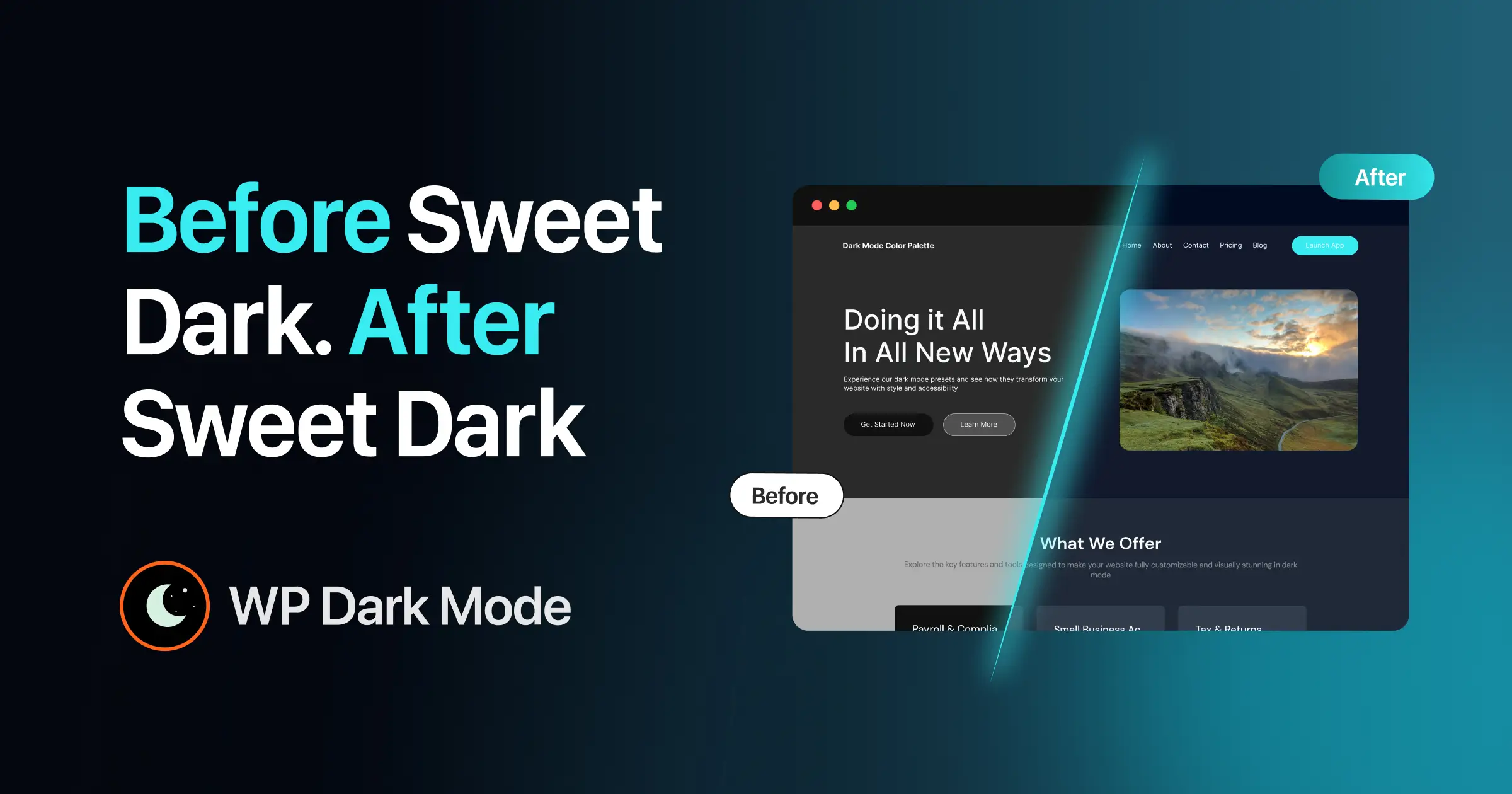
Step into a world of sleek design with WP Dark Mode’s new Sweet Dark Theme. This modern default replaces the old Automatic Color mode and brings crisp contrast, a polished look, and easy readability. Whether you run a personal blog or a business site, Sweet Dark makes dark mode not just useful but truly eye-catching.
Why does this matter? It’s a clear boost to your visitors’ experience. In this post, we’ll show what makes Sweet Dark stand out, how it improves user engagement, and the simple ways you can shape it to fit your brand.
Table of Contents
- Why Sweet Dark Matters: A Quick Look at the New Theme
- Side by Side: Why Sweet Dark Beats Auto Color
- Is Sweet Dark Worth It? Here’s the Easy Answer
Why Sweet Dark Matters: A Quick Look at the New Theme
Sweet Dark Theme from WP Dark Mode steps in as the new default dark mode for WordPress sites, taking over from the outdated Automatic Color setting. It transforms websites with a polished, modern aesthetic and sharp contrast that ensures text stands out clearly on dark backgrounds. This upgrade significantly enhances user experience, delivering a refined design that looks stunning across any type of site.
For those just starting with WP Dark Mode, Sweet Dark guarantees a sophisticated first impression right after installation. It also comes with customization features, letting you tweak colors to seamlessly blend dark mode with your site’s unique style. Ideal for maintaining a professional appearance, this theme ensures visitors enjoy a soothing browsing experience in low-light conditions.
Side by Side: Why Sweet Dark Beats Auto Color
In the past, WP Dark Mode relied on the Automatic Color setting, which adapted the theme based on a user’s device or preferences. While it got the job done, the results were often inconsistent and lacked visual appeal. Fast forward to now, and Sweet Dark changes the game entirely. This new theme delivers a uniform, stylish design every single time, ensuring your website looks polished and feels inviting, no matter the viewing platform.
Is Sweet Dark Worth It? Here’s the Easy Answer
Wondering why everyone’s buzzing about this update? Let’s dive into the standout reasons Sweet Dark marks a major leap forward for dark mode on WordPress sites.
- Instant Wow Factor
Picture this: A first-time visitor lands on your site and is immediately struck by a sleek, modern dark mode theme. Sweet Dark is crafted to make that killer first impression. Unlike the older Automatic Color mode, which sometimes felt off or uneven, this theme ensures your site looks top-notch from the get-go, leaving a lasting impact on every visitor.
- Sharper Text and Superior Contrast
Dark mode is a lifesaver for reducing eye strain, and Sweet Dark takes it to the next level with bold contrast between text and background. No more squinting in dim lighting—your content stands out with clarity. We’ve all stumbled across sites where text fades into the background, making reading a chore. With this theme, every word is crisp, and the backdrop complements rather than competes, making late-night browsing a breeze. 🌙
- Effortless Setup and Personalization
Think Sweet Dark might be tricky to handle? Think again. WP Dark Mode keeps things straightforward and approachable, no tech wizardry required. You can install and tailor it with ease to suit your site’s unique style. Tweak the colors, switch up the toggle design, or even skip dark mode on specific sections all through a user-friendly settings page in the plugin. Its customization is simple, putting you in full control.
Top Sweet Dark Features You Notice Right Away
- Default Theme for Newcomers
Great news for anyone just starting with WP Dark Mode: Sweet Dark comes pre-set as the default theme for all fresh installations. Once you add the WP Dark Mode plugin, it’s all set up and ready to impress. No need to fuss over picking a theme, Sweet Dark ensures your site looks fantastic right from the first click.

- Plenty of Customization Choices
While Sweet Dark shines straight out of the box, you might want to add a personal touch to match your site’s vibe. WP Dark Mode makes tailoring a breeze with several handy options:
- Tweak the Color Palette: Pick from preset schemes or craft a custom look that’s all your own.
- Redesign the Toggle Button: Change up the switch that lets users flip between light and dark modes to fit your style.
Skip Certain Sections: Keep specific areas, like headers or footers, in light mode with just a few clicks.
- Seamless Fit Across Themes
Whether you’re managing a minimalist blog or a bustling online store, Sweet Dark blends in effortlessly. It’s built to complement any WordPress theme, offering unmatched versatility. No matter your site’s layout or design, you won’t have to stress about dark mode looking out of place. Sweet Dark adjusts smoothly to enhance every setup.
Turn On Sweet Dark: The Easy Way to Begin
Excited to bring Sweet Dark to your website? Let’s walk through the easy steps to set it up and running in no time.
- Install WP Dark Mode
If you haven’t yet added the WP Dark Mode plugin to your site, here’s the quick process:
- Head to your WordPress dashboard.
- Navigate to Plugins > Add New.
- Type WP Dark Mode into the search bar.
- Hit Install Now, then click Activate once it’s done.
And just like that, you’re ready. With the plugin active, Sweet Dark automatically becomes your default dark mode theme, ready to impress.
👉Read the full Documentation: New Default Color Preset: “Sweet Dark”
Why Sweet Dark Wins: The Top Reasons in Short
Let’s sum up why Sweet Dark stands out as the ideal pick for your WordPress site:
- Boosts User Experience
Featuring sharp contrast, readable text, and a contemporary style, Sweet Dark elevates how visitors interact with your site. It’s the perfect blend of flair and functionality, ensuring a comfortable viewing experience that’s easy on the eyes.
- Makes Your Site Look Cutting-Edge
A polished, modern dark mode like Sweet Dark keeps your website feeling current and relevant. Whether it’s a personal blog or a professional business page, this theme adds that sought-after sophisticated touch that sets you apart.
- Hassle-Free Setup and Control
No need for tech skills to make Sweet Dark work for you. It’s a breeze to install and personalize, even if dark mode is new territory for your site. With just a few clicks, this plugin transforms your website’s appearance effortlessly.
Try Sweet Dark Now and Give Your Site New Life
Now that you’ve seen what WP Dark Mode’s Sweet Dark Theme offers, it’s time to upgrade your website. Its polished design, better readability, and easy customization make it a top pick for any WordPress site. Whether you’re aiming to reduce eye strain or add a modern flair, Sweet Dark has you covered.
Why settle for average when you can impress every visitor from the start? With Sweet Dark, first impressions are always striking.
Ready to go dark? 😉
Transform your site into a stylish, user-friendly space with just a few clicks. Activate WP Dark Mode’s Sweet Dark Theme today and let your site stand out. Happy customizing, and enjoy the Sweet Dark vibe. 🌙✨
Sweet Dark Made Clear: Simple FAQ for All Users
1. What is WP Dark Mode’s Sweet Dark Theme?
Sweet Dark Theme is the new default dark mode for WordPress sites using the WP Dark Mode plugin. It delivers a sharp, modern style that cuts down on eye strain and boosts text readability. Designed to pair effortlessly with any WordPress theme, it ensures a smoother browsing experience from the very first visit.
2. Why did WP Dark Mode make Sweet Dark the default?
The earlier Automatic Color setting often fell short in delivering a uniform look across sites. Sweet Dark steps in with a consistent, refined design that instantly elevates your site’s appeal. With bold contrast, clear text, and a fresh aesthetic, it’s ideal for creating a striking impression, especially in dim lighting.
3. How do I add Sweet Dark to my website?
If you don’t have WP Dark Mode yet, head to your WordPress dashboard, search for WP Dark Mode, and click Install followed by Activate. Once it’s up and running, Sweet Dark automatically becomes your default dark mode theme. For existing users, it’s set as the default on new setups with no extra steps needed.
4. Can I tweak Sweet Dark to match my site’s style?
Absolutely. WP Dark Mode offers simple ways to customize the Sweet Dark Theme to reflect your brand. Adjust the color palette, fine-tune contrast levels, or redesign the toggle switch for switching between modes. You can even keep specific sections in light mode if that suits your layout better.
5. How do I set up a dark mode toggle on my site?
Adding a toggle is a breeze:
- Navigate to WP Dark Mode > Switch Settings.
- Turn on the floating switch feature.
- Pick a toggle design or upload custom icons.
- Hit Save Changes.
Your visitors can now effortlessly switch between light and dark modes with the toggle.
6. Does Sweet Dark work with every WordPress theme?
Yes, Sweet Dark is crafted to integrate smoothly with all WordPress themes, from basic blogs to intricate e-commerce platforms. It adapts to your site’s design without any hiccups. No matter how simple or elaborate your theme, Sweet Dark enhances it with a polished look.
7. Is Sweet Dark an improvement over Automatic Color?
Definitely. Unlike Automatic Color, which varied based on user settings and often looked inconsistent, Sweet Dark offers a reliable, sleek appearance straight away. With superior readability and contrast, it’s a smarter pick for a professional and visually pleasing dark mode.
8. Do I need tech skills to use Sweet Dark?
Not in the slightest. Sweet Dark is built for ease, requiring no coding know-how. You can install and personalize it through the intuitive settings page of the WP Dark Mode plugin. Whether you’re a newbie or a pro, setting it up is quick and painless.
9. Can I revert to the old Automatic Color theme?
Yes, if you miss Automatic Color or want to explore other options, switching back is simple. Just head to the WP Dark Mode settings in your WordPress dashboard, where you’ll find the choice to select a different theme, including the older one.
10. How does Sweet Dark enhance user experience?
Sweet Dark improves readability, cuts down on eye fatigue, and brings a clean, modern vibe to your site. It makes browsing more comfortable for those who prefer dark mode, especially during nighttime or in low light. This can keep visitors on your site longer, potentially boosting engagement.
11. Can I apply Sweet Dark to an existing site?
Of course. You can add Sweet Dark to any current WordPress site by installing the WP Dark Mode plugin. Once active, it sets itself as the default dark mode theme, and you’re free to tweak its settings to align with your site’s look or branding.
12. Is Sweet Dark the only theme in WP Dark Mode?
Not at all. While Sweet Dark is the default, WP Dark Mode includes other color presets like Blue, Midnight, and Violet to suit different tastes. If none fit, you can even craft custom colors to perfectly match your site’s aesthetic.
13. How does Sweet Dark make my site stand out?
Using Sweet Dark gives your site a contemporary, professional edge. It creates an instant, stylish impact that helps you shine in a crowded online space. Offering dark mode also enhances user comfort, encouraging engagement with its eye-friendly design.

Add your first comment to this post