









Table of Contents
Overview #
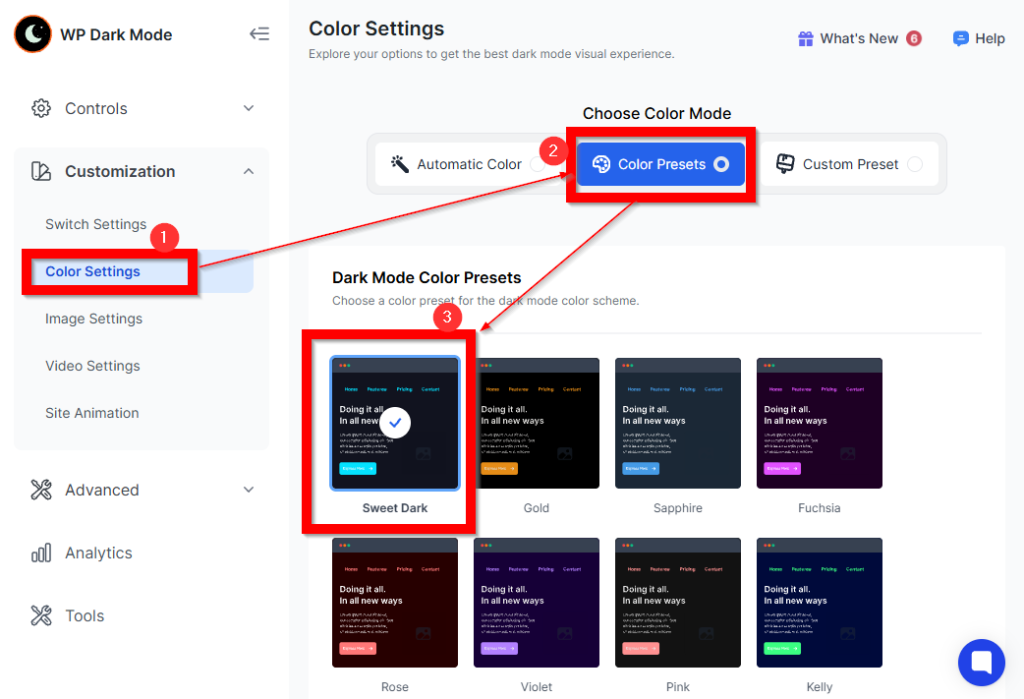
A new default color preset, “Sweet Dark” has been introduced to enhance the overall visual experience for all users. This update replaces the previous Automatic Color mode, which was the legacy default option.
Starting from this release, all new installations will have the Sweet Dark color preset applied automatically during initial setup.
Where to Find the Color Preset Setting
WP Admin → WP Dark Mode → Settings → Appearance → Color Presets
Purpose of the Update
The Sweet Dark palette ensures: #
- Improved visual clarity
- Better aesthetic consistency across the plugin
- A refined first-time user experience
Impact on New Installations #
- For all new installations, Sweet Dark will be selected automatically under the Color Presets settings.
- Users can still manually switch to any other available preset at any time.
Impact on Existing Installations #
- Existing users will retain their current color preset unless changed manually.
- No settings will be overwritten during the update.
Benefits of the “Sweet Dark” Preset
- Consistent dark-themed interface optimized for readability
- Enhanced contrast for improved usability
- More modern and polished design
- Better out-of-the-box appearance for new users
Frontend Screenshot
The following screenshot illustrates how the Sweet Dark preset appears on the frontend interface:

Notes
- This change affects new installations only.
- All color presets remain fully accessible for customization.


Add your first comment to this post