









Overview: This feature introduces built-in dark mode support for all WordPress authentication pages, including:
- Login
- Register
- Lost Password / Reset Password
- WooCommerce My Account (login/register)
Dark mode behavior on these pages now automatically follows the Frontend Dark Mode settings configured in the plugin (Default, OS-based, Time-based, or Sunset mode). All pages will seamlessly adapt to the selected mode and remain visually consistent with your site’s frontend appearance.

Compatibility with Popular Plugins
- LoginPress
- Theme My Login
- Plugins that rename or protect the login URL

Floating Switch Visibility (Premium)
A new premium option is available to control whether the floating dark-mode switch appears on login and register pages.
Setting Location:
WP Dark Mode → Settings → Customization → Switch Settings
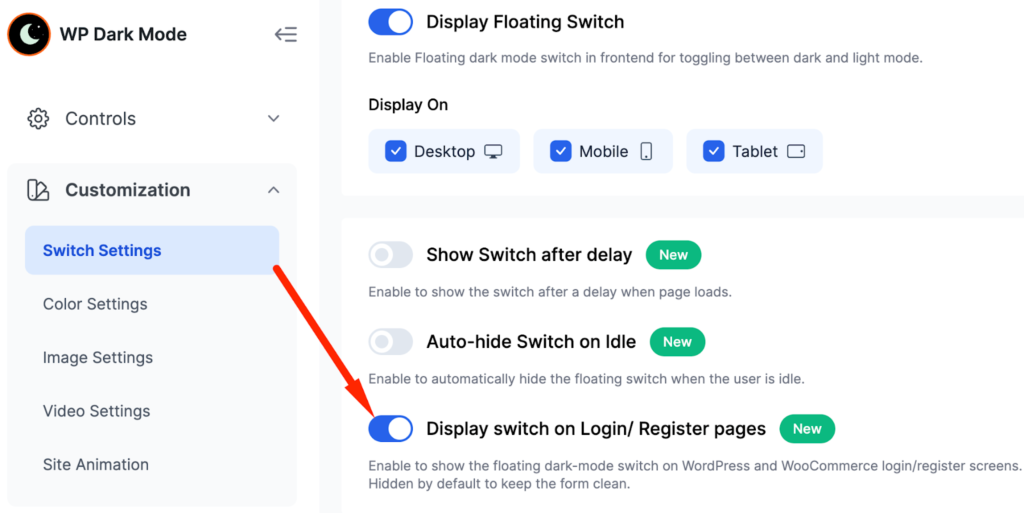
Once the “Display switch on Login/ Register pages” feature is enabled, a floating dark-mode switch becomes visible on all supported login-related pages. This switch allows end users to manually toggle dark mode on or off directly from the login interface.


Add your first comment to this post