









Table of Contents
Overview #
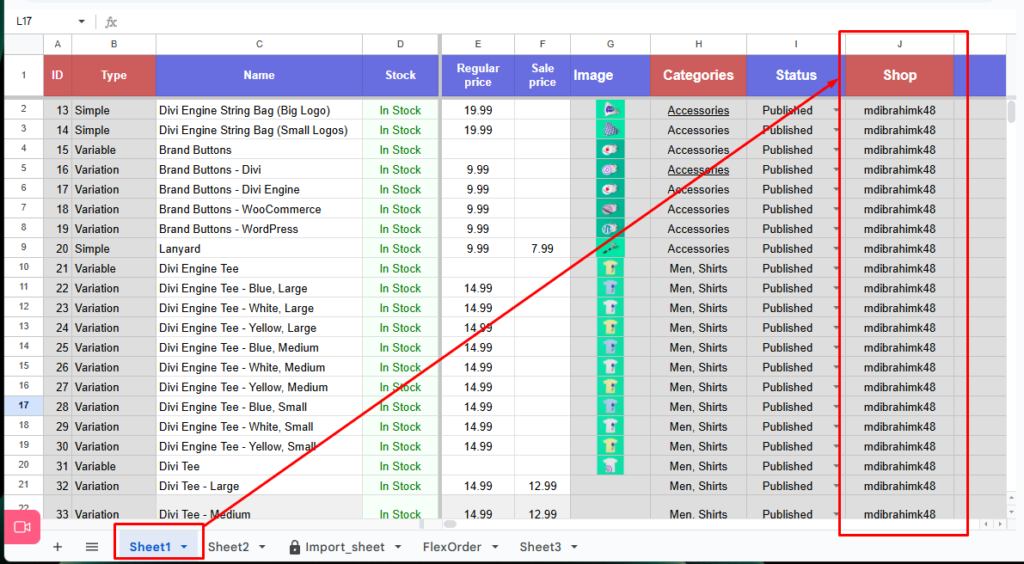
The “Display Shop/Vendor Name” column is a new FlexStock feature that lets you quickly identify which shop or vendor owns each product. When enabled, this column appears in your connected Google Sheet, helping you manage products more clearly – especially in multi-vendor stores with many sellers.
Why This Feature Is Useful #
Managing a store with multiple vendors can get complicated. This feature helps by providing:
- Instant vendor identification: No need to open individual product pages – view vendor ownership right in the list.
- Faster review and moderation: Ideal for checking vendor updates, price changes, and stock adjustments.
- Better organization for large catalogs: Makes it easier to manage hundreds or thousands of vendor products with confidence.
How to Enable or Disable the Vendor Name Column #
You can turn this feature on or off at any time from the FlexStock settings panel.
Steps: #
- Go to WP Admin → FlexStock → Settings
- Look for the option labeled “Display Shop/Vendor Name.”
- Check the box to enable the column, or uncheck it to hide it
- Click Save Changes

Once enabled, the Shop/Vendor Name column will appear in your connected Google Sheet, allowing you to see which vendor each product belongs to.


Add your first comment to this post