









Last updated: November 15, 2026
In today’s article, we are going to show you how to use Easy Video Reviews with EDD integration and collect video reviews for your site.
There are numerous e-commerce plugins for WordPress, and two of the most popular ones you are probably familiar with are WooCommerce and Easy Digital Downloads. Easy Digital Downloads (EDD), created by Pippin Williamson, is a free WordPress e-commerce plugin that focuses purely on digital products. Its primary goal is to make selling digital products simple and complete.
Easy Digital Downloads are fast and very easy to use. As it is made for selling digital products, then you will get all the benefits of it while selling digital products. You can have it up and running in a matter of minutes. Just add your payment details, create your digital products, and you’re pretty much all set.
On the other hand, Easy Video Reviews has created a storm after its release. This WordPress testimonial plugin has made collecting video reviews a piece of cake. Customers can record a live video review or upload a pre-recorded video to your website.
With its features, customers will be more than convinced to do a video review for you. It also has integrations with Elementor, WooCommerce, Gutenberg along EDD.
And today we are going to show you how to set up Easy Video Reviews with EDD that will help you collect video testimonials for your eCommerce store. Here we go.
Table of Content
Using Easy Video Reviews with EDD integration, Collecting Video Testimonials
There are 5 steps to using Easy Video Reviews with EDD integration. Then you can easily collect video testimonials for your website. Let’s get on with the steps, shall we?
Step 1: Install Easy Video Reviews Plugin
Just like any other WordPress plugin, you can easily download and install this WordPress Testimonial plugin from the WordPress repository. Or you can navigate to WP Admin–> Plugins–> Add New and type Easy Video Reviews Plugin. Download and activate the plugin.

After installing the plugin, go to WP Admin–> Easy Video Reviews, and you can view the plugin dashboard.
Step 2: Installing Easy Digital Downloads Plugin
In the next step, you need to install the Easy Digital Downloads. Just go to Plugins–> Add New. Type Easy Digital Downloads. Then install and activate the plugin.
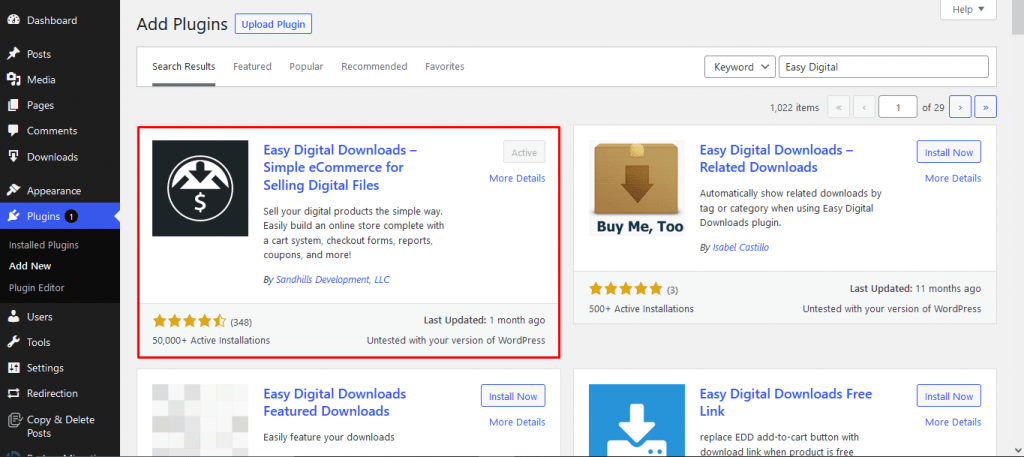
Find out here how to set up Easy Digital Downloads.
Step 3: Enable EDD Integration on Easy Video Reviews
Nest, you need to enable the EDD option from Easy Video Reviews plugin. Navigate to Easy Video Reviews–> Integrations. There you will find the EDD option. Enable the Show Video Review button and Ask for a review in thank you email. Customize the emails and save settings.
That means, when an order is complete, the customer will see a video review button.
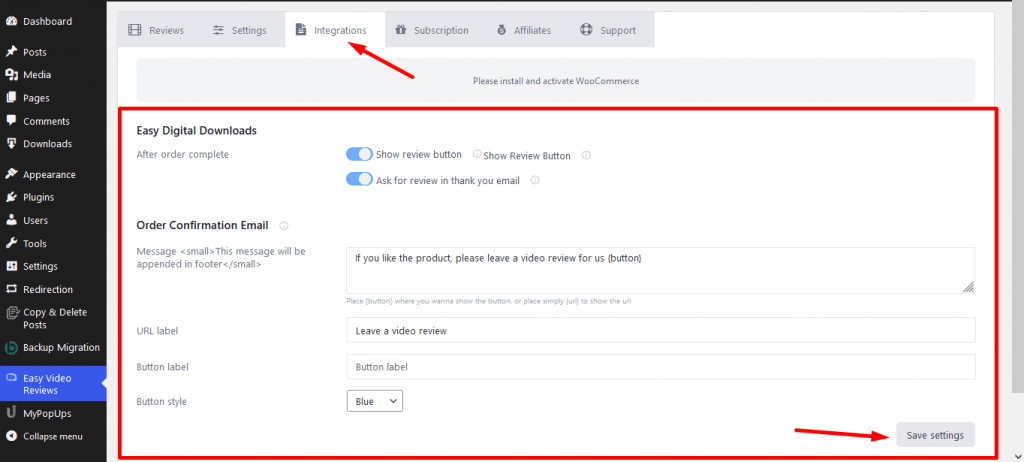
Step 4: Make a Purchase
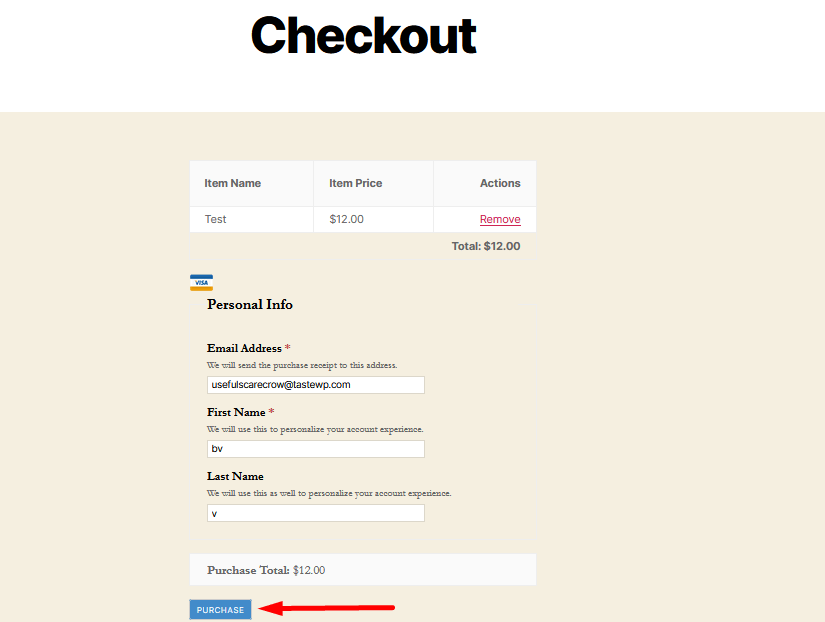
Make a purchase from your eCommerce store.

Step 5: Complete the Order
Add your payment details and complete the order. Remember this is just the test purchase.
After completing the order, you will be able to see a Video Review Button. Customers can use this button to record a video review.

See, this is how easily you can use Easy Video Reviews with EDD integration to collect video reviews for your online store.
Frequently Asked Questions
Can I collect video testimonials with Easy Digital Downloads?
Yes. Easy Video Reviews has an EDD integration. Once you enable it, customers who complete a purchase can record a short video review of the product they bought, and you approve it before it appears on your site.
How do I enable the EDD integration in Easy Video Reviews?
Install both Easy Video Reviews and Easy Digital Downloads, then go to the Easy Video Reviews settings and switch on the EDD integration. After that, completed orders give customers the option to leave a video review.
Are video reviews useful for digital products?
Very. Buyers can’t touch a plugin, ebook or course before paying, so seeing another customer talk about how it helped them removes a lot of doubt. Short videos work well on sales pages and checkout pages.
Do I need WooCommerce to use Easy Video Reviews?
No. It works on any WordPress site, and it integrates with WooCommerce and Easy Digital Downloads if you sell products. You can also use it on a plain service or portfolio site.
When should I ask EDD customers for a video review?
Ask after they’ve had time to use the product, like a week after purchase for a plugin or ebook. Asking right after checkout is too early, because customers haven’t seen any results yet.
Can I show EDD video reviews on product pages?
Yes. Use the showcase block, widget or shortcode to display approved video reviews on your download pages, close to the buy button where they help most.
Conclusion
So, now you know how to use Easy Video Reviews with EDD integration for collecting video testimonials.
Video testimonials are an easy way to gain the trust of your users. Because when your users will see their fellow piers singing praises for your products then they will automatically believe in your products.
And when you can ask for a video review with the popular Easy Digital Downloads, then collecting video reviews will be a piece of cake.


Add your first comment to this post