









Did you know that nearly 70% of WooCommerce store owners say order management is one of the most time-consuming parts of their day?
Between correcting addresses, adjusting order notes, tracking product-level details, creating multiple rows for different products, or digging through spreadsheets just to find one small mistake – it quietly adds up.
On average, a typical store spends 10–12 hours every month doing work that should take minutes.
It’s the kind of invisible load no one talks about, but everyone feels.
And the truth is simple: managing orders shouldn’t feel like managing chaos.
Our Mission: Simplify the Way You Work
From the very beginning, FlexOrder has been built around one clear goal: Make WooCommerce order management faster, cleaner, and easier for teams.
Your store runs on WooCommerce.
Your day-to-day operations run in spreadsheets.
FlexOrder connects both worlds so you can work the way you already prefer – without extra steps and without losing control.
Momentum: A Smarter, Leaner FlexOrder
This November, we’re introducing seven important updates, each crafted to remove a specific frustration shared by store owners, fulfillment teams, and agencies.
Every improvement comes from real conversations – the kind where someone says,
“This is good… but I wish I could do this one more thing.”
So, we listened.
We refined it.
We tested every case.
And now, we’re rolling out a FlexOrder that feels faster, lighter, and more flexible than ever – designed to take hours of busywork off your plate and give you more time for the work that actually moves your business forward.
Address Splitting: Because Data Should Be Clean, Not Complicated
Let’s talk about something that happens in almost every WooCommerce store.
A customer places an order. Their shipping and billing details – name, phone, city, ZIP – all get packed into one giant text block.
And the next time you open your Google Sheet, it’s chaos.
You can’t filter by city. You can’t segment by region. You can’t automate anything.
That ends today.
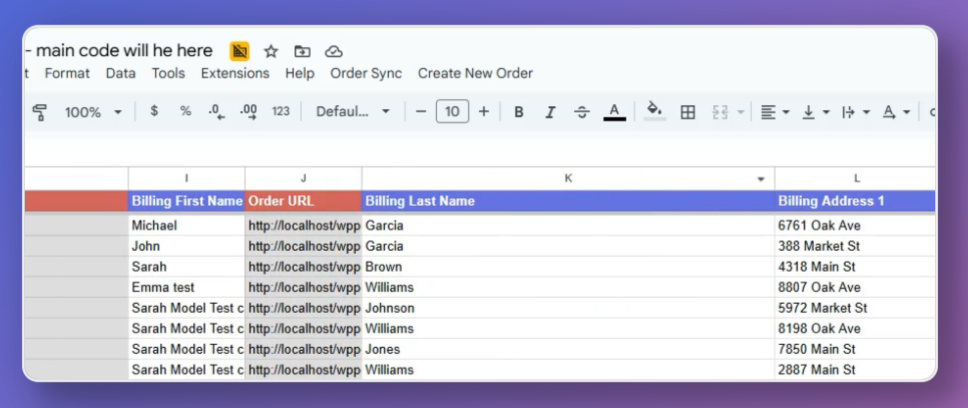
Address Splitting separates every customer detail into its own column – cleanly, automatically, and beautifully.
How it works: FlexOrder intelligently parses both billing and shipping details during sync, mapping them into dedicated columns like First Name, Phone, City, Country, and more.
To take full control of customer information, you can easily modify billing and shipping addresses directly from Google Sheets. Follow our documentation to learn step-by-step instructions on how to edit and update address details, ensuring your records stay accurate and up-to-date.
Business impact:
- Instantly filter by city or ZIP for localized marketing
- Clean, ready-to-analyze data without formulas
- Zero manual formatting ever again
“We used to waste hours cleaning addresses before exporting. Now the data is perfect the moment it hits our sheet.” – Beta User Feedback
Filter Orders: Focus on What Matters
Here’s a question: Why scroll through all your orders when you only need to see the ones from this week?
Until now, FlexOrder showed every single order from your store by default – even if you only needed the latest batch.
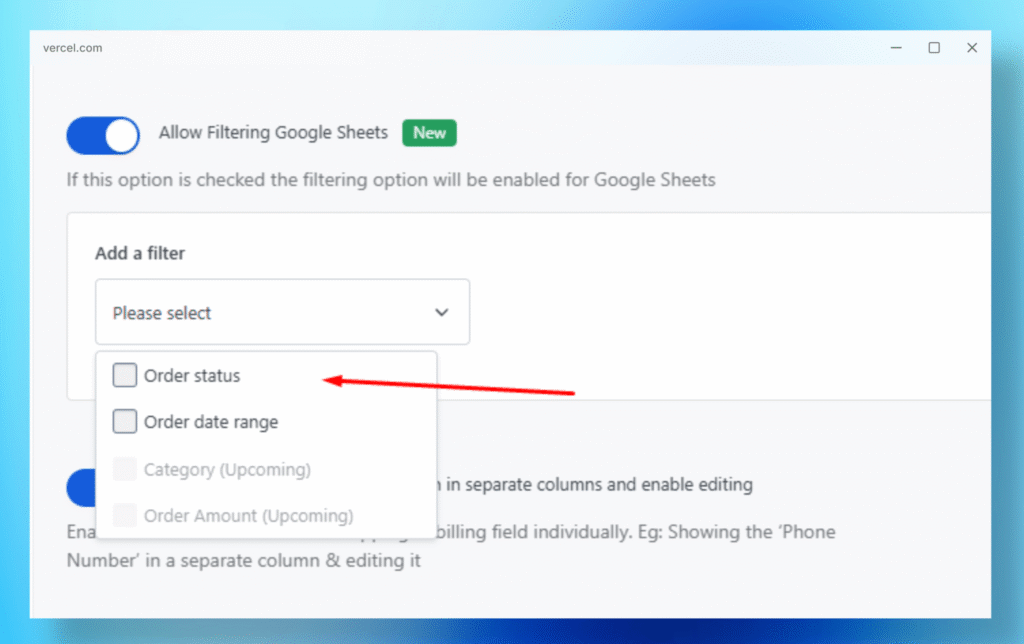
With Order Filtering, you can now choose exactly what comes into your sheet.
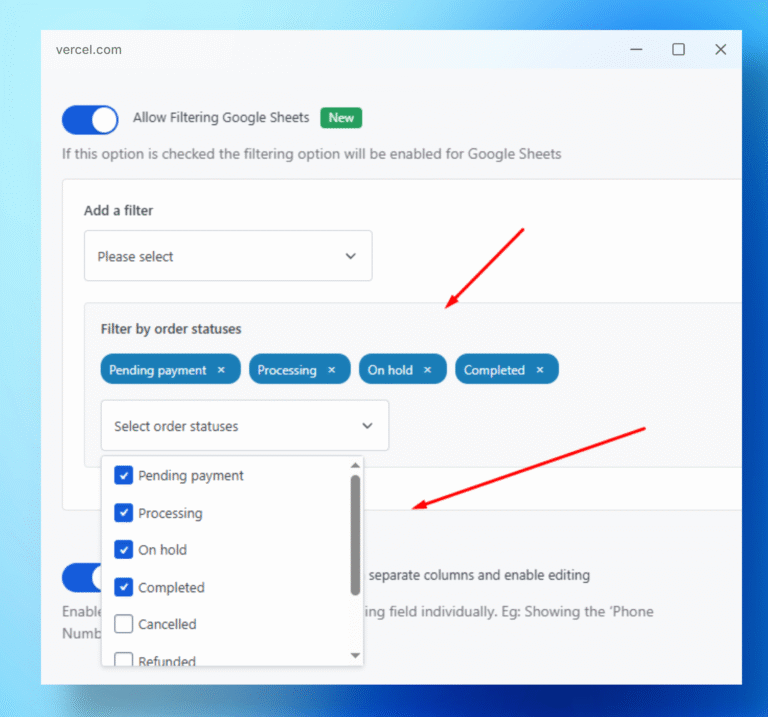
Filter by status, date range, or order age. Want to see just your completed orders from the last 30 days? Done.
How it works: Set your preferred filters in the FlexOrder dashboard – when you sync, only those filtered orders will appear.
For a step-by-step guide, see: How to Filter WooCommerce Orders by Status and Date Range.
Business impact:
- Lighter, faster spreadsheets
- More focused team workflows
- Cleaner reporting for specific campaigns
“Filtering reduced our sheet size by half and doubled our sync speed. Huge win.” – Agency Partner
Column Re-Arranging: Your Data, Your Layout
Every store operates differently.
Some teams need customer data up front. Others care about totals first.
Until now, FlexOrder used a fixed column layout. That rigidity is gone.
Now, you can rearrange columns freely using Google’s drag-and-drop function – and FlexOrder remembers your layout between syncs.
How it works:
Just drag a column where you want it. The next sync keeps your order intact.
Business impact:
- Build layouts that match your workflow
- No resets or reformatting
- Ideal for agencies managing multiple clients
“Finally, I can organize columns my way – and it sticks. It’s a small detail that changes everything.” – Early Adopter Review
Order Sorting: Find the Right Data in Seconds
Imagine needing to find your top-selling order – fast.
Before, you’d scroll. A lot.
Now, with Order Sorting, you can sort orders by Order ID, Date, Total, or Quantity – instantly.
How it works:
Use Google Sheets’ native sort functions – FlexOrder’s clean data structure ensures nothing breaks.
Business impact:
- Instantly spot top-value customers
- Analyze order trends by date or spend
- Build revenue reports in seconds
“Sorting by total price showed us who our VIP buyers were. That insight alone paid for the plugin.” – Store Owner Feedback
Show Products in Separate Rows: Clarity Meets Control
Let’s be real – multi-product orders are a headache.
When multiple items sit inside one row, it’s nearly impossible to get accurate product-level analytics.
Show Products in Separate Rows changes that.
Each product in an order now appears in its own row, giving you full visibility into item-level performance.
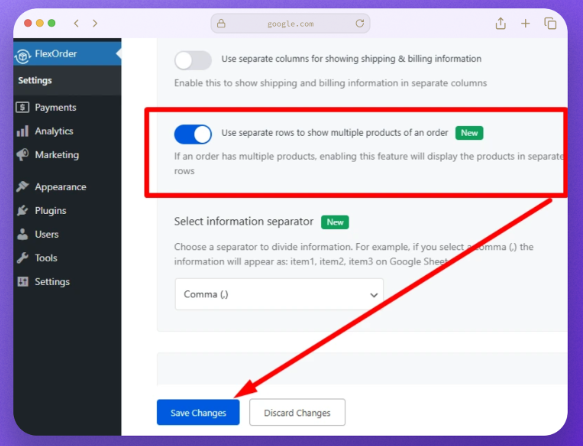
How it works: Enable the setting, and FlexOrder automatically expands orders with multiple products into individual rows, same order ID, different products.
For detailed steps on customizing this layout, visit: How to Display Products in Separate Rows in FlexOrder.
Business impact:
- Accurate product-level reporting
- Simplified exports for analysis
- Cleaner insights into order composition
“I can finally track individual product sales without breaking my sheet apart.” – Ecommerce Manager Feedback
Edit Shipping & Billing Information from Sheets: Instant Fixes, Zero Friction
Mistakes happen.
A customer misspells their address. You spot it.
But why should you log into WooCommerce just to fix one line of text?
With this new update, you don’t have to.
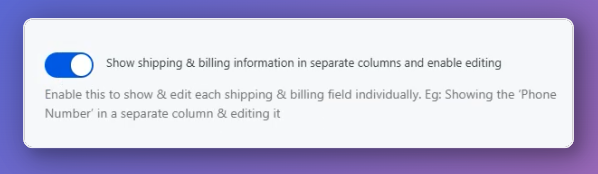
You can now edit both shipping and billing details directly from your connected Google Sheet – and FlexOrder syncs the changes back automatically.
(You’ll just need to enable Split Viewing first.)
For step-by-step instructions, see: How to edit shipping and billing addresses from Google Sheets.
Business impact:
- Correct errors instantly
- Save time on admin edits
- Keep WooCommerce perfectly synced
“It feels like editing WooCommerce right inside Sheets – no extra steps, no delays.” – Early Tester Feedback
Create Orders from Sheets: Power Meets Simplicity
This one changes everything.
Picture this: you need to create a new WooCommerce order on the fly – maybe it came from a manual sale, a wholesale request, or a customer support call.
Now you can do it directly from your Google Sheet.
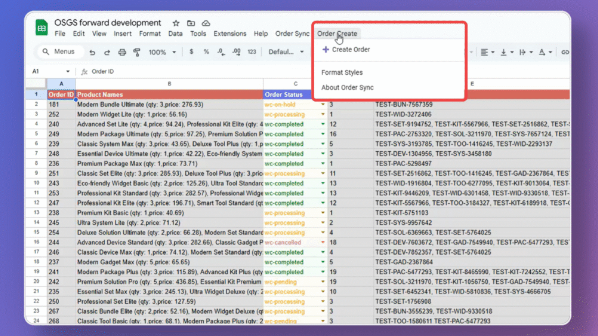
How it works:
Just fill in the required order fields (customer details, product, quantity). FlexOrder syncs it instantly to WooCommerce, creating a new order in real time.
For step-by-step instructions, see: How to create WooCommerce orders from Google Sheets.
Business impact:
- Zero switching between tools
- Perfect for manual or phone orders
- Faster operations for teams and agencies
“We can create test or manual orders right from Sheets – that’s huge for our daily workflow.” – Agency Admin Feedback
The Bigger Vision: From Plugin to Command Center
These seven updates aren’t random – they’re part of a larger evolution.
FlexOrder is no longer just a WooCommerce connector.
It’s becoming your command center for storing data – where every insight, every change, and every order lives in one clean, controllable workspace.
Here’s what’s next on our roadmap:
- Multi-Store Dashboard – sync and manage multiple stores seamlessly
- Smart Scheduling – automate syncs and updates
- Performance Insights – visualize your data flow and trends
- Duplicate Detection & Cleanup – automatically fix data inconsistencies
Every feature we add brings us closer to a single promise: That managing your store’s data will one day feel as effortless as reading it.
What Users Are Saying
FlexOrder continues to grow because real store owners and teams trust it to simplify their daily work.
Here’s what users are sharing on WordPress.org:

- “Amazing plugin – it speeds up my store.”
– Saila Nasrin - “Great support! The team helped me quickly and professionally.”
– Kemal Esensoy - “Easy order management with Google Sheets.”
– George Harry - “Excellent plugin and support.”
– aaron58 - “Good plugin, does what it promises.”
– ilwoody - “Working well now after updates.”
– aminul007
These voices remind us why every update matters – real stores, real challenges, real results.
If you’re ready to work smarter and manage your WooCommerce orders with clarity, now is the perfect time:
Update to the latest version of FlexOrder or install it for the first time – and experience a faster, cleaner, more flexible workflow inside Google Sheets.
👉 Update your plugin to get the new features
👉 Or install FlexOrder today and see the difference for yourself
Make your order management effortless – starting now.
Your Next Step
All these features are available today in the latest version of FlexOrder. Whether you’re already using it or completely new, here’s how to get started:
If You’re an Existing FlexOrder User
Experience the new updates in four simple steps:
- Update your FlexOrder plugin to the latest version.
Or, If You’re New to FlexOrder
Follow these steps and learn how to install and set up the FlexOrder:
- Log in to your WordPress Dashboard.
- Go to Plugins → Add New.
- Search for “FlexOrder”.
- Install and activate the plugin.
- Open FlexOrder → Connect Account and complete the setup.
- Create or sync your Google Sheet with your WooCommerce orders.
In minutes, you’ll be managing your orders faster and more efficiently – right inside Google Sheets.
Final Thought
Managing your orders shouldn’t slow you down. It should give you clarity.
And that’s what this update is about – turning the noise of eCommerce data into something simple, powerful, and human. Update FlexOrder now – and take back control of your WooCommerce order management.


Add your first comment to this post