









Overview #
ArchiveMaster allows you to archive and manage order data efficiently. At times, you may need to switch to a different archive storage type or location. Before proceeding, it is important to understand how this change impacts your archived data.
What Happens When You Switch Archive Storage #
- Changing the archive storage will update the location of your archived database.
- Depending on the selected storage type, your existing archived data may or may not be moved to the new location.
- This means that some archived orders may not be available in the new storage if they are not properly migrated.
Important Recommendations Before Switching #
To avoid data loss or inconsistencies, follow these steps before switching archive storage:
- Unarchive Orders: Move your archived orders back to the live database.
- Switch Storage: Change your archive storage to the new preferred location or type.
- Re-Archive Orders: Archive the required orders again, ensuring they are stored safely in the newly selected archive storage.
Confirmation Prompt #
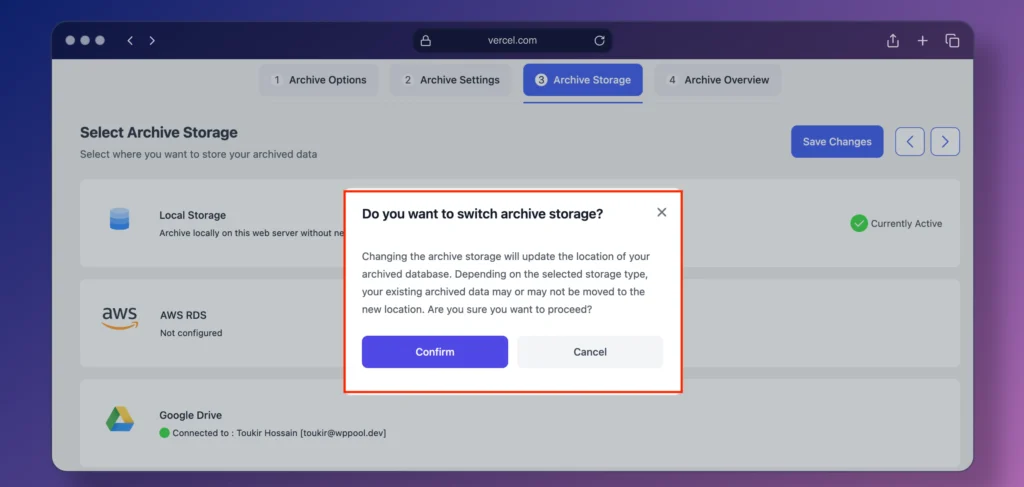
When you attempt to switch archive storage, you will see a confirmation prompt:
“Changing the archive storage will update the location of your archived database. Depending on the selected storage type, your existing archived data may or may not be moved to the new location. Are you sure you want to proceed?”
Carefully review this message and proceed only if you have followed the recommendations above.
Conclusion #
Switching archive storage is a critical operation that affects where and how your archived data is stored. By unarchiving orders first and re-archiving them after the switch, you can ensure data integrity and prevent potential data loss.


Add your first comment to this post